YouTube Shorts Ideas Without Showing Your Face
Key takeaways
- Five faceless formats cover most Shorts: text-on-screen tips, screen recordings, AI-narrated lists and stories, hands-only before-and-afters, and slide countdowns.
- Text-on-screen tips are the easiest beginner format: 5 to 10 short lines over stock footage with captions, no voice or filming needed.
- Gaming is the easiest faceless niche because gameplay footage replaces the camera entirely.
- Faceless channels face the same monetization rules as any other: 1,000 subscribers plus 4,000 watch hours in 12 months or 10 million Shorts views in 90 days.
- Post the same vertical video to TikTok and Shorts, but put the payoff earlier for TikTok and rewrite captions for each platform.
The best YouTube Shorts ideas without showing your face are screen recordings, stock-footage clips with captions, text-on-screen tips, before-and-after shots of your work, and AI-narrated list videos. Each format needs one tool, one footage source and about 30 minutes, so you can make your first Short today and post daily without ever appearing on camera.
What are the best YouTube Shorts ideas without showing your face?
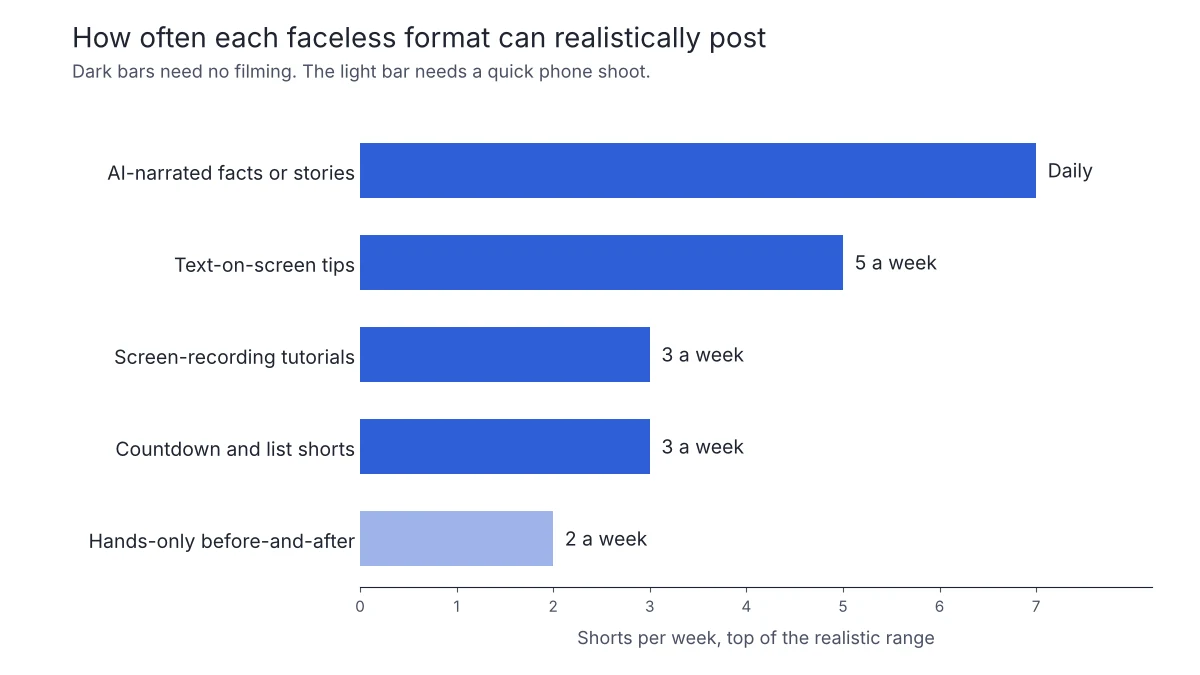
Five faceless formats cover most of what local businesses and solo channel owners post. Each one is made differently, so pick the one that matches what you already have.
| Format | How it's made | Realistic cadence |
|---|---|---|
| Text-on-screen tips | Stock b-roll plus captions | 3 to 5 a week |
| Screen-recording tutorials | Screen capture plus captions | 2 to 3 a week |
| AI-narrated facts or stories | Script, AI voiceover and stock footage | Daily |
| Hands-only before-and-after | Phone shots of the process | 1 to 2 a week |
| Countdown and list shorts | Slides made into vertical video | 2 to 3 a week |
Text-on-screen tips over stock or b-roll footage
The lowest-effort format: one tip per Short, written large on screen, over stock footage of your industry. A gym might post "three warm-up mistakes" over b-roll of dumbbells; a restaurant posts plating shots with a caption overlay. It takes a script and a render and no filming, which is why so many faceless channels run it daily.
Screen-recording tutorials and walkthroughs
If your business touches software, record your screen. Real estate agents walk through listing tools, med spa owners show booking flows, and anyone can demo a spreadsheet or a comparison. Screen recordings need no camera and, with captions, no voiceover, and they show expertise better than stock footage can.
AI-narrated facts, stories and news Shorts
This is the classic faceless channel format: a script, an AI voiceover, and stock or generated visuals cut to fit. It suits channels built on facts, local history or industry news rather than a personal brand. If you want it running on autopilot, VideoContent's faceless YouTube channel automation writes, narrates, renders and posts each Short for you.
Before-and-after and process videos shot hands-only
Point your phone at the work, not your face. A cleaner shows a stained grout line, then the finished result. A landscaper films a hedge trim from start to finish. This is the only format here that needs filming, but hands-only shots take two minutes and need nothing beyond trimming.
Data, countdown and list Shorts built from slides
Ten slides, one fact each, made vertical: "5 neighbourhoods where rents rose fastest" or a countdown of this month's most-ordered dishes. You probably already have the data. Turning slides into a Short takes minutes, and captions can stand in for a voice.
Whichever format you pick, monetization follows the same rules for faceless and on-camera channels. The YouTube Partner Program needs 1,000 subscribers plus either 4,000 watch hours in the last 12 months or 10 million Shorts views in the last 90 days (YouTube Help). Our YouTube Shorts monetization checklist walks through each step.
Which faceless Shorts ideas work without a voiceover too?
Skip the mic entirely with formats that lean on captions, on-screen text and music. Text-on-screen tips work well: "3 things to check before signing a lease" over stock b-roll, one line per beat. So do before-and-after reveals (a gym floor transformation, a staged living room), countdown Shorts ("top 5 patio spots in [city]"), and quote or stat cards with music underneath.
They are all made the same way: pick a hook, layer stock footage or photos, burn in captions, add music. AI narration is optional, not required. VideoContent's YouTube Shorts generator writes the text, makes the vertical video and posts it on schedule, starting from a prompt, and Blog to Video starts from a blog post link.
An honest caveat: text-only Shorts from our own tool can read as generic if you skip the narration and never customise the hook. Local specifics, such as a real price or a named neighbourhood, fix that faster than any editing feature.
How do you make gaming Shorts without showing your face?
Gaming is the easiest faceless niche because the gameplay is the footage. Record a 30 to 60 second clip of a clutch play, a funny fail or a hidden mechanic, then add on-screen commentary like "wait for the last 5 seconds" and captions. No face and no voiceover needed.
Three formats work consistently: highlight clips with a hook caption, quick tips ("do this before you loot that building"), and before-and-after or progression clips. Post in vertical 9:16. YouTube accepts Shorts of up to three minutes (YouTube Help), but highlight clips usually land best well under one minute.
For the workflow, screen-record on your console or PC, drop the clip into an editor that adds captions automatically, and batch three to five in one sitting. Then schedule them so one goes out each day rather than all at once.
What easy YouTube Shorts ideas can a beginner make in under an hour?
Three formats cover most beginners, and all three can be batched in one sitting.
- Text-on-screen tips: write 5 to 10 short lines about your business (a gym could do "3 mistakes people make on the leg press"), put them over stock footage or a plain background, and add captions. No voice needed.
- Photo walkthroughs: photograph something you already have, like a restaurant's daily special or a finished renovation, and sequence the stills with text overlays. One shoot gives you a week of vertical video.
- Blog to Shorts: take an existing post, pull out its key points, and let AI narrate and make the video. This is the fastest path if you already have written content, and it is what VideoContent's Blog to Video does: script, voiceover, captions and render.
To batch all three in one hour, write your lines first, gather footage second and make the videos third. Then post one a day rather than three at once.
How do faceless Shorts ideas differ from faceless TikTok ideas?
The core asset is the same vertical video, so one file can go to both. What changes is length and the hook. YouTube Shorts allow up to three minutes (YouTube Help) and viewers accept a slower build, so a story or countdown with a five-second setup still works. TikTok viewers swipe away sooner, and TikTok says its recommendations weigh whether people watch a video to the end (TikTok newsroom), so put the payoff in the first second and cut tighter. Our faceless TikTok video ideas covers the TikTok side.
Posting the same video to both is normal, but check the captions and hashtags for each platform rather than copying them blind. Tools like OpusClip and quso.ai focus on clipping and captioning one recording for several feeds. VideoContent takes the same vertical video and posts it to YouTube, TikTok, Instagram and Facebook on schedule, with formats like the true crime shorts generator built for daily faceless output.
How do you pick a faceless Shorts niche that can grow?
Three tests decide whether a faceless niche survives past week three.
- Topic supply: can you list 50 videos before making one? Real estate has "5 questions to ask before renting", "what closing costs actually are" and neighbourhood walk-throughs. If you stall at ten ideas, the niche is too thin.
- Cost per video: a text-on-screen Short with stock footage and an AI voiceover takes minutes; anything that needs new filming for every post will break your streak. Posting consistently matters more than polish.
- Business fit: a med spa gets nothing from a gaming channel. Pick a niche where every Short can end with a reason to contact you.
Run all three before you record anything.
What tools and workflow do you need to post faceless Shorts daily?
Comparing the main tool options
Most tools do one slice of the job. Submagic, OpusClip and quso.ai work on footage you already have, and AutoFaceless and ShortGenius generate faceless videos. The question to ask each one: can it go from a topic to a finished vertical video with captions and a voiceover, then post it on schedule, without you opening an editor? If a tool only makes clips and you still post by hand, a daily cadence breaks the first week you get busy.
A same-day workflow using VideoContent
Put our own product through the same test. VideoContent covers idea to scheduled post: it writes the script, narrates it, makes the vertical video with captions and hashtags, then posts to YouTube, TikTok, Instagram and Facebook. The free plan lets you test the output before paying. Pro is $19 a month for finished videos, Pro+ at $39 a month adds scheduled posting to one platform, and posting to two, three or all four platforms is $59, $69 or $79 a month (pricing). What it won't do is replace footage of your actual business: a restaurant still wants real kitchen shots now and then, while the AI videos cover the days you would otherwise not post at all.
Same-day version: pick three formats from the sections above, make one of each, and schedule a week of countdown and story Shorts before lunch.
FAQ
Can a faceless YouTube Shorts channel actually get monetized?
Yes. The Partner Program requirements are the same for faceless and on-camera channels: 1,000 subscribers plus either 4,000 watch hours in 12 months or 10 million Shorts views in 90 days (YouTube Help). What matters is reaching those thresholds and following YouTube's policies, including its rules on reused and repetitive content.
Do YouTube Shorts need a voiceover to perform well?
No. Text-on-screen tips, before-and-after reveals, countdown Shorts and quote or stat cards all work with captions and music alone. Narration is optional. The main risk with text-only videos is a generic hook, so add local specifics like a real price or a named neighbourhood.
What is the easiest no-face YouTube Shorts idea for a total beginner?
Text-on-screen tips. Write 5 to 10 short lines about your business, put them over stock footage or a plain background, and add captions. No voice and no filming. A photo walkthrough of something you already have, like a finished renovation, is a close second and gives you a week of clips from one shoot.
Can I post the same faceless video on TikTok and YouTube Shorts?
Yes, and it is normal practice. The vertical video works on both. Adjust the length and the hook: TikTok viewers swipe away sooner, so put the payoff in the first second, while Shorts viewers will sit through a five-second setup. Rewrite captions and hashtags for each platform rather than copying them.
How long should a faceless Short be?
Keep most of them under 60 seconds, in vertical 9:16. Shorts can run up to three minutes (YouTube Help), but countdowns, tips and before-and-afters usually land inside 30 to 45 seconds. Shorter videos are also easier to batch, so you can make three to five in one sitting.