25 Small Business YouTube Video Ideas Sorted by Goal
Key takeaways
- Sort every video idea into one of four goals: local visibility, trust, product education, or retention, and give local visibility the largest share.
- Nineteen of the 25 ideas pass the phone-only test, needing just a phone, a window, and optionally a $30 tripod and clip-on light.
- Film one job once and cut three videos from the same footage: a tutorial, a behind-the-scenes clip, and a before/after.
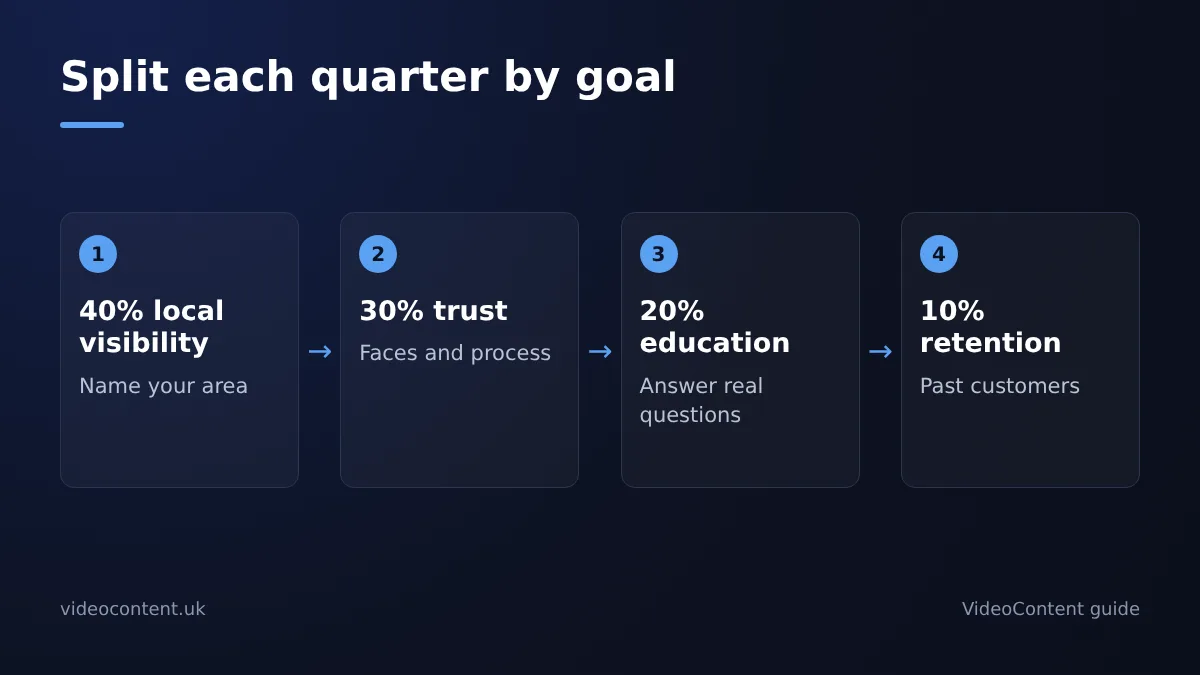
- A sustainable cadence is one video per weekday, roughly 65 per quarter, split 40% local visibility, 30% trust, 20% education, 10% retention.
- Faceless formats trade trust for volume, so keep at least one on-camera video per quarter even if the rest are faceless.
The best small business YouTube video ideas are the ones mapped to a goal: local visibility, trust, product education, or retention. Below are 25 ideas, each tagged with the goal it serves, the gear it needs (usually just your phone), and minutes of filming time, so you pick by outcome instead of chasing trends.
Which YouTube video types actually drive local customers versus just views?
A view only pays when the viewer could walk through your door. Sort every small business youtube video idea into four goals: local visibility (getting found by people in your service area), trust (showing the faces and standards behind the business), education (explaining what you sell and what it fixes), and retention (keeping past customers coming back). Anything that doesn't serve one of those is a vanity view.
The four goals that matter for a 1-10 person business
Local visibility videos name your city, your street, your service radius. Trust videos are behind-the-scenes and staff on camera. Education videos answer the questions customers already ask. Retention videos go to people who already bought. Each goal gets its own quarterly quota, decided in a later section.
Why viral formats fail local businesses
A million-view Short from outside your service area converts to nothing. YouTube surfaces Shorts to broad audiences based on watch behaviour, per YouTube's documentation, so a trend-chasing clip reaches strangers, not nearby buyers. Our own YouTube Shorts generator will happily make a generic viral-style clip too, and it's usually the wrong first pick for a salon or a plumber. Pick by outcome, not by trend.
What are the 25 ideas at a glance?
Here is the full list. Nineteen need only a phone; the six that need extra gear are marked so you can defer them.
| Idea | Goal | Gear |
|---|---|---|
| Before/after of a job | Local visibility | Phone |
| Workspace tour | Local visibility | Phone |
| Neighbourhood landmark intro | Local visibility | Phone |
| Job of the week in your area | Local visibility | Phone |
| Local event or partner shout-out | Local visibility | Phone |
| Seasonal reminder for your area | Local visibility | Phone |
| Drone flyover of your location | Local visibility | Drone |
| Answer a real customer question | Trust | Phone |
| Meet the owner | Trust | Phone |
| Team intro | Trust | Phone |
| Behind-the-scenes prep | Trust | Phone |
| Day in the life | Trust | Phone + gimbal |
| Customer review read-out | Trust | Phone |
| Interview a regular customer | Trust | Phone + mic |
| How-to tutorial | Education | Phone |
| Myth vs fact | Education | Phone |
| Price breakdown | Education | Phone |
| What to expect at a first visit | Education | Phone |
| Staged product close-up | Education | Lights + tripod |
| Side-by-side comparison demo | Education | Tripod + second camera |
| Seasonal tips for past customers | Retention | Phone |
| New service announcement | Retention | Phone |
| Aftercare or maintenance tips | Retention | Phone |
| Thank-you or milestone video | Retention | Phone |
| Studio-lit brand video | Retention | Lights + mic |
How do you choose a video idea when you have no budget for equipment?
Run every idea through the phone-only test first: can you film it with your phone and a window? Nineteen of the 25 ideas in this framework pass. Before-and-after shots, staff intros, a walkthrough of your space, answering the question customers asked you twice this week, all of it needs a phone and decent light. Nothing else.
Six ideas need more, and each one is flagged so you can skip or defer it rather than stall your schedule hunting for gear. A drone flyover of your location or a staged product close-up can wait until the phone-only videos are already bringing in views.
When a $30 purchase is worth it: a small tripod and a clip-on light cover the most common failures, shaky footage and dark rooms. That is the whole starter kit. If you would rather not touch editing at all, captioning tools add captions and a hook to raw phone clips, and script-to-video tools like VideoContent make videos with no footage at all; we compare the categories in our breakdown of AI business video tools.
What should a service business film before it ever films a product?
Service businesses sell outcomes and trust, not SKUs, so the first videos you film are the ones that answer "can I trust these people with my face, my home, my dog?" Four idea types do that job, and none of them need a product shot.
Local customers check you out online before they call, as the BrightLocal Local Consumer Review Survey shows year after year. Film the trust content first.
Before/after and transformation content
A messy garage becoming a clean one, a patchy lawn becoming a striped one. Film the "before" on your phone in 10 seconds, film the "after," let the tool add captions and a hook. Minimum budget: $0. Time cost: 5 minutes of filming.
Answer-the-question videos from real customer messages
Open your inbox or DMs, copy the last question a customer asked, answer it to camera in 45 seconds. Each message is one video idea, and you already have dozens.
Meet the owner and team intros
A 30-second "here's who's actually showing up at your house" video outperforms most polished ads for trust. Film it once, pin it.
| Idea | Goal it serves | Equipment | Time per video |
|---|---|---|---|
| Before/after | Local visibility | Phone | 5 min |
| Answer-the-question | Trust-building | Phone | 10 min |
| Team intro | Trust-building | Phone | 15 min, once |
| Workspace tour | Local visibility | Phone | 20 min, once |
If you'd rather not appear on camera at all, voiceover-and-b-roll versions of all four work too; see faceless YouTube channel automation for how that's handled without editing.
When does a behind-the-scenes video outperform a tutorial?
Match the video to where the viewer sits in the customer journey. Someone who already follows you and has booked once does not need another how-to; they need reasons to trust you and come back. That is behind-the-scenes territory. A stranger searching "how to fix a leaky tap" is earlier in the journey, and a tutorial is what they typed.
BTS for trust: process, prep, and honest mess
Film the prep before a service, the setup, the cleanup, and the small failures along the way. Honest mess reads as proof you do the work daily, which is exactly what builds retention with existing customers. A salon showing the 6am restock or a gym re-racking weights after close signals real operation, not polish.
Tutorials for search: the how-to queries people type
Tutorials win when the viewer is problem-aware and searching. "How often should I get a facial?" or "how to price a deep clean" pull in strangers comparing options. Publish tutorials to attract, BTS to keep, and batch both in one sitting so neither gets skipped.
How do you turn one video idea into three without doubling filming time?
The one-session, three-video method
Film one job or appointment once, then cut three vertical videos from the same footage: a tutorial, a behind-the-scenes clip, and a before/after. You shoot for 20 minutes, not an hour, because every setup you record feeds all three cuts. Captions and hooks get added in the edit, which is where a tool like CapCut handles the basics for free.
A worked example: one job site, three videos
A salon color correction gives you: a 30-second tutorial explaining the toner choice, a 15-second BTS clip of the foiling process, and a 10-second before/after with a text hook. Schedule all three across the week with a scheduler like our TikTok video scheduler so one filming session covers seven days of posting.
Which video formats work for businesses whose owners don't want to be on camera?
Faceless formats ranked by effort
Text-over-footage is the cheapest start: film your workspace, a job site, or a plate coming out of the kitchen, add captions and a hook, done. Before/after slideshows rank next — three to five photos, a caption sequence, and they suit salons, cleaners, and remodelers perfectly because the result is the proof. Voiceover walkthroughs take more planning since you write a script, but you can record audio on your phone in one take.
AI-generated shorts are the lowest-effort option. Tools like Submagic, SendShort, and quso.ai (Vidyo) turn a script or existing footage into captioned vertical video, and VideoContent generates a short-form video from a prompt in under 60 seconds, with rendering on Pro ($19/month) and scheduled posting on Pro+ ($39/month). OpusClip works the same direction: feed it long footage, it clips Reels and TikTok-ready cuts.
Where faceless content falls short for local trust
Faceless formats trade trust for volume. A viewer deciding on a med spa injector wants to see the injector, so keep at least one on-camera video per quarter — a staff intro or a walkthrough of your space — even if the rest of your quota is faceless.
How many videos per goal type should a small business publish per quarter?
A realistic cadence is one video per weekday, a rhythm most small teams can sustain if they batch. Over a 13-week quarter that's roughly 65 videos, split by outcome rather than trend-chasing.
The quarterly quota table
Out of ~65 videos: 26 (40%) for local visibility, 20 (30%) for trust-building, 13 (20%) for product education, and 6 (10%) for retention. Map your 25 ideas against those buckets first, then fill gaps with repeats of what worked. Local visibility gets the biggest slice because most SMBs lose more revenue to being undiscovered than to being untrusted.
What to do when you miss a week
Don't backfill every missed slot; that leads to burnout and filler. Post the missed idea in the next matching bucket instead, and trim the retention bucket first since it carries the smallest quota. One consistent weekday beats five erratic ones.
How do you keep the posting schedule going when you will never edit a video?
What to look for in a short-form video tool
You need four things: auto-captions that don't need fixing, hooks written for you, vertical output sized for Reels, TikTok, and YouTube Shorts, and scheduled posting so you can batch a month in one sitting. If a tool misses scheduled posting, you're back to manually uploading at 6am, which is exactly the habit that dies by week three.
VideoContent against the alternatives, honestly
Run every option through the same test: film 60 seconds on your phone, paste the transcript, and see how much you still have to fix. VideoContent generates the short-form video end to end in under a minute, which suits an owner-operator who will never open an editor. Submagic, OpusClip, quso.ai, and SendShort all compete in the same category, and CapCut remains the status quo if you want hands-on control. Where VideoContent falls short: the free plan is capped at 3 script generations, it works from prompts rather than your own footage, and you get less manual editing control than CapCut. If you like to nudge every cut and caption by hand, CapCut is the better fit. If you want the video done, VideoContent is the faster path.
Free tier to paid: when upgrading pays for itself
The 3 free script generations tell you whether the ideas and hooks fit your business, with no credit card. Upgrade to Pro at $19/month for finished videos, or Pro+ at $39/month once scheduled posting becomes the thing keeping your quota alive. If one booked appointment covers the month, the decision makes itself.