Best Video Script Generator for Instagram, TikTok & Shorts
A video script generator turns one written script into finished vertical videos for Instagram, TikTok, and YouTube Shorts, so you can post daily without touching an editor. This guide shows the exact workflow with real format specs per platform, then scores the main tools, including ours, against a checklist you can reuse.
What does a video script generator actually do?
A video script generator takes written text and turns it into a finished vertical video: voiceover, captions, visuals, and hook included. You paste a script or a few bullet points, and it outputs a clip sized for Reels, TikTok, or YouTube Shorts.
The four product categories people lump together
"AI video generator" covers four different jobs, and buyers mix them up constantly.
| Category | What it does | Example |
|---|---|---|
| Script-to-video | Script in, finished short-form video out | VideoContent |
| Avatar tools | A talking head reads your script | — |
| Clip repurposers | Cut long videos into shorts | OpusClip, quso.ai |
| Caption/editing apps | Polish footage you already shot | CapCut, Submagic |
Why the distinction matters for your workflow
If you have no footage and no editor, a repurposer is useless and an avatar tool looks fake. Script-to-video is the only category that starts from nothing but words. YouTube Shorts are vertical videos up to 3 minutes long (YouTube Help), which is the format these tools output by default. Agencies reselling this workflow can see the agency-specific setup on the AI video generator for agencies page.
Can one script really work on Instagram, TikTok, and YouTube Shorts?
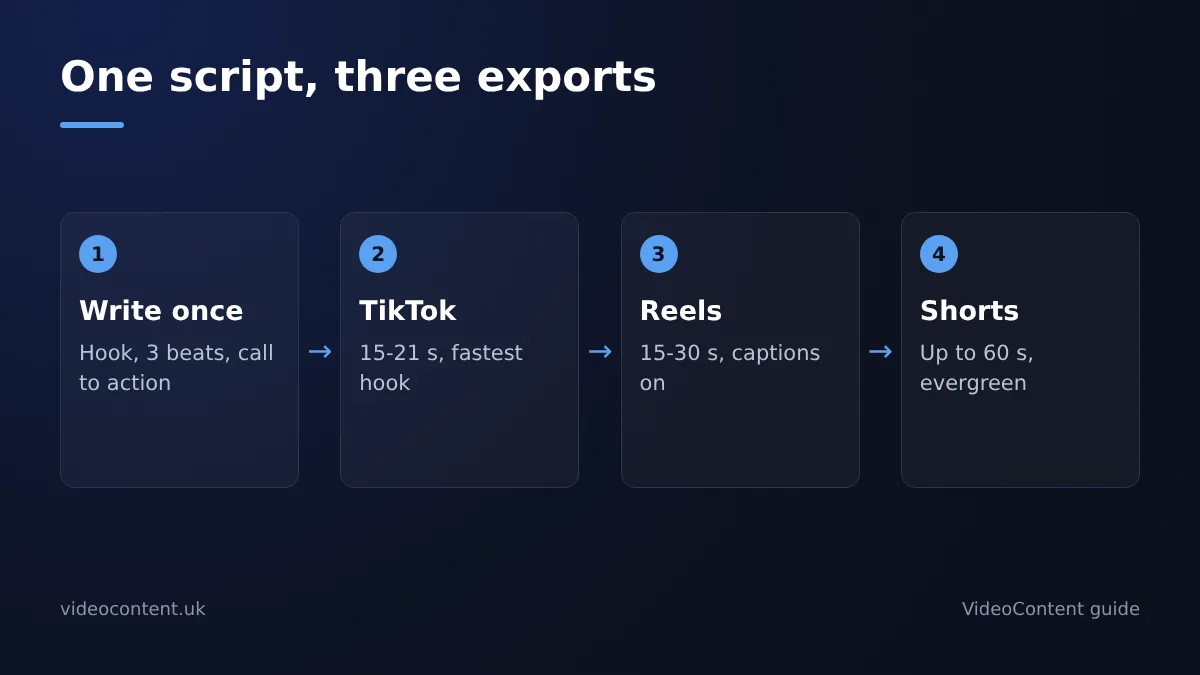
Yes, but only if you change the format per platform. The script stays the same; the length, aspect ratio, and hook timing do not. A tool that exports one identical MP4 to all three platforms is doing half the job.
Instagram Reels spec
Reels reward slightly longer watch time, so a 15-30 second vertical video (1080x1920, 9:16) works well for most local businesses. Your hook still needs to land in the first 1-2 seconds, but Reels viewers will tolerate a slightly slower open than TikTok. Captions are essential since most people watch muted while scrolling. Instagram's help pages list current Reels settings (Instagram Help Center).
TikTok spec
TikTok is the fastest to lose a viewer. Keep it between 15-21 seconds, vertical 9:16, with the hook in the first 1-2 seconds or the swipe happens before your offer appears. Native-feeling text overlays and quick cuts matter more here than polish.
YouTube Shorts spec
Shorts run up to 60 seconds and can pull more views over weeks, so evergreen scripts (a gym tip, a med spa FAQ) fit best. Same 1080x1920 vertical format, hook in the first 2 seconds. YouTube shows your title, so the first line of your script doubles as the title.
A med spa running one script through all three specs gets three native videos instead of one recycled file.
How do you turn one script into three platform-native videos in under 60 seconds?
Step 1: Write or paste the script
Start with the words, not the visuals. A 30-second script for a med spa might read: hook ("3 things nobody tells you before Botox"), three short beats, one call to action. Paste it in as plain text or let the tool draft it from a prompt. If you already post captions with your before-and-after photos, those work as a starting script too.
Step 2: Choose platform presets
Pick the platform and the tool adjusts the rest. Instagram Reels want a 9:16 frame and captions in your brand colors. TikTok rewards a faster hook in the first two seconds. YouTube Shorts tolerate a slightly slower pace. You set the preset once; the tool handles aspect ratio, caption style, and pacing per platform, so one script becomes three exports without re-editing. A restaurant running a weekly special can generate all three versions from one script, as shown on the AI video generator for restaurants page.
Step 3: Generate and schedule
Hit generate and the tool assembles voiceover, captions, and b-roll into finished vertical clips. Review the captions, since AI still mishears industry terms. Then schedule posts for the week. Tools like Submagic follow a similar paste-and-generate flow, so test two before committing.
What should a video script generator include for local businesses?
Must-haves
Your tool needs to write hooks that stop the scroll, auto-generate captions (many people scroll with the sound off, so this is non-negotiable), and output vertical 9:16 video by default. It should also produce a natural-sounding voiceover so you never have to record your own. VideoContent covers all four on Pro, and Pro+ adds scheduled posting so a week of videos goes out while you're running your business.
Nice-to-haves
Hashtag suggestions per platform, multiple voiceover accents so your salon doesn't sound like a robot, and templates matched to your trade (before-and-after formats for med spas, menu close-ups for restaurants). These save minutes per video, not hours.
Dealbreakers
A watermark on paid tiers. If you're paying $9-39 a month, your videos should carry your name, not the tool's. Also watch for credit systems where one render eats a large share of your balance. And be honest about where any tool falls short: none of them, including VideoContent, will fix a boring script. If the hook is weak, no generator saves it.
How do the main tools compare side by side?
The evaluation checklist applied to every tool
Judge every tool on five things: does it write the script or expect you to bring one, does it produce vertical video natively, does it add captions and voiceover without a second app, does it post on a schedule, and what does a month of daily use actually cost. The same five questions apply whether you open CapCut, Submagic, OpusClip, quso.ai, or SendShort. Many owners skip these questions, then discover the tool they picked was built for a different job entirely, because "AI video generator" covers about four different product categories and "best" depends on which job you mean. Watch the credit model too. Flat monthly pricing beats per-clip credits when you publish daily.
Where VideoContent falls short
Honest list: VideoContent writes scripts, generates the vertical video, adds captions and voiceover, and schedules posting, but it will not turn your existing long-form footage into clips the way OpusClip does, so repurposing webinars is not its job. Like its AI story reels generator, it starts from a text prompt, which means scripted, faceless-style output rather than footage of your actual staff or premises. If your Reels need to show the real gym floor, film it yourself and use a captioning tool instead.
How much should you pay for a script-to-video tool?
Why credit pricing burns people
Credit-based plans look cheap until one usable clip eats a third of your balance. If you post daily, that model punishes exactly the habit you're trying to build.
Flat-rate vs credit models
A flat monthly plan removes the guesswork: you know the cost whether you generate 10 videos or 100. Our free plan gives you 3 script generations with no card; Starter ($9) removes the watermark, Pro ($19) renders unlimited standard videos, and Pro+ ($39) adds scheduled posting. Compare that before you commit anywhere else.
One honest caveat: our free plan's video carries a watermark, and so do many competitors' free tiers. CapCut's free editing is genuinely strong, but check its official page for current watermark terms before you build a posting habit on it.
Which tool fits your situation: business owner, freelancer, or faceless channel?
Local business owner
You need scheduled daily posting more than raw volume. Pick a tool that turns a script into a finished vertical video with captions and voiceover, then posts to Reels, TikTok, and YouTube Shorts on a calendar. VideoContent's Pro+ plan at $39/month covers that, and the free plan's 3 script generations tell you fast whether the ideas fit your business.
Freelancer or small agency
Your bottleneck is client volume, not one account. You need batch generation across multiple brands and clean exports you can hand over. Run a paid pilot with one client's scripts before committing, and check per-generation limits against your roster size.
Faceless channel operator
Volume is the whole job. You want hooks, scripts, and voiceover generated together so one idea becomes several posts. Be honest about our limits here: VideoContent targets business posting workflows, so if you need dozens of exports daily, test whether it holds up on Pro before committing.
FAQ
What is the best free video script generator with no watermark?
No tool gives unlimited free exports without a watermark, and most competitors' free tiers watermark too. VideoContent's free plan offers 3 script generations with no card required, and its free video carries a watermark. If watermark-free output matters, expect to pay a flat monthly fee rather than hunting for a genuinely free option, because paid tiers remove it.
Can an AI video generator through script post automatically to TikTok and Instagram?
Some can, most cannot. Script-to-video tools that include scheduled posting, like VideoContent, push finished videos to a calendar across platforms. Others only export an MP4 and leave posting to you. Before committing, check whether scheduling is built in or sold as a separate tier, since manual posting defeats the point of generating a week of videos in one sitting.
Do I still need to edit the video after the AI generates it from my script?
Usually just a caption check. The tool assembles voiceover, captions, and visuals automatically, but AI still mishears industry terms, so review captions before posting. You may also want to swap a weak visual or tighten the hook. Expect a minute or two of review per video, not a full editing session, unless the script itself was weak to begin with.
How long should a TikTok video script be compared to a YouTube Short?
TikTok scripts should run 15-21 seconds, because viewers swipe within the first 1-2 seconds if the hook is slow. YouTube Shorts can stretch to 60 seconds and suit evergreen scripts, since Shorts keep pulling views for weeks. One script can serve both: keep the words identical and let platform presets adjust pacing, length, and format per export.
Is a script-to-video generator the same as an AI avatar tool?
No. An avatar tool makes a talking head read your script on screen, which can look stiff for local businesses. A script-to-video generator turns text into a finished vertical video with voiceover, captions, and visuals, no on-camera face required. They sit in different product categories, and picking the wrong one is the most common buying mistake in this space.