AI Video for Advertising: A Buyer's Guide
Key takeaways
- Generate 3-4 ad variants from one brief by changing only the hook, so every performance difference traces to the first two seconds.
- Each variant needs roughly $30-50 of spend on Meta or TikTok before the algorithm can judge it, so cap variants at four on a small budget.
- Kill a variant if its cost per lead is 2x the best performer after 3-4 days; scale winners by raising budget 20-30% every two days.
- Test variants organically for 3-4 days first, then pay to boost only the clips that earned the most watch time.
- Check platform specs and AI disclosure rules before rendering, and listen to every voiceover variant before spending on promotion.
AI video for advertising lets you turn one product brief into several testable short-form ad variants in under an hour, without editing skills or a marketer on staff. This guide walks through the workflow: writing a brief, generating variants with different hooks and captions, and running them on a small paid budget with clear kill and scale rules.
What is AI video for advertising and when should paid media teams use it?
AI video for advertising means generating short, vertical ad clips from a text brief: hooks, captions, voiceover and visuals assembled by software, ready for Reels, TikTok and YouTube Shorts. You write what the ad should say; the tool produces the video.
The four product categories people confuse
"AI video generator" covers four different kinds of tool. Text-to-video generators create scenes from prompts. Avatar tools make a synthetic presenter read a script. Editing tools like CapCut cut and caption footage you already have. Repurposing tools like OpusClip and SendShort slice long videos into clips, and tools like Submagic and quso.ai sit closer to editing and repurposing. For paid ads made from scratch, you want the first category.
One catch: ad platforms set their own rules for AI-generated and digitally altered content, so read the Meta Advertising Standards and the equivalent TikTok policies before you launch.
When AI video ads make sense for a small budget
Use it when you need volume: five to ten variants of one offer to A/B test, or daily posting you cannot edit by hand. Skip it when the ad depends on footage you must film, like a walkthrough of your salon or gym. VideoContent fits the volume case: brief in, vertical ad video out in under 60 seconds in Standard mode.
Which AI video tools can actually produce ad-ready short-form video?
Comparison criteria for ad creative
Judge tools on what paid ads need: vertical 9:16 output, captions burned in, a hook in the first two seconds, clean exports without a watermark, and predictable pricing so a test budget doesn't evaporate. Run every candidate through the same five checks.
| Tool | Best at | Watch out for |
|---|---|---|
| VideoContent | Brief-to-video ads with captions; videos from $19/mo, scheduled posting on Pro+ | Limited fine-grained editing for brand perfectionists |
| Submagic | Fast caption styling | Fewer generation controls |
| OpusClip | Repurposing long footage into clips | Needs existing footage |
| quso.ai (Vidyo) | Clip generation from existing video | Needs existing footage |
| SendShort | Quick faceless shorts | Limited customization |
| CapCut | Free manual editing | You do the editing yourself |
Where VideoContent falls short
Honest scoring: VideoContent generates from a text brief, which is faster than clip-repurposing tools if you have no footage, but slower than Submagic if you already have a great raw clip. You get fewer manual controls than CapCut. If your ads need frame-level tweaks or a custom avatar, a clip editor plus an editor's time may still beat it.
How do you brief an AI video tool to produce ad-compliant creative?
The one-paragraph ad brief template
Fill this in before you touch any generator, including ours:
- Offer: what they get, the price, the deadline ("$99 first facial, this week only")
- Audience: who it's for and where they scroll ("women 30-55 on Instagram Reels")
- Hook: the first 3 seconds, written out word for word
- Proof: one real result, review, or before/after
- CTA: one action, spoken and captioned
- Captions and hashtags: on by default; most viewers watch muted
- Format: 9:16 vertical, under 30 seconds
A brief this specific works in any tool. For med spa owners, we keep a pre-filled version of this template on our med spa solution page.
Platform policy checks before you generate
Ad platforms reject video for reasons a generator won't catch: text taking up too much of the frame, banned claims ("guaranteed results"), or the wrong aspect ratio. Check specs before rendering, not after rejection. TikTok, for example, recommends vertical 9:16 for in-feed ads in its video ad specifications. One honest limitation: AI voiceover can mispronounce brand or ingredient names, so listen to every variant before you spend a dollar promoting it.
How do you turn one brief into multiple AI video ad variants?
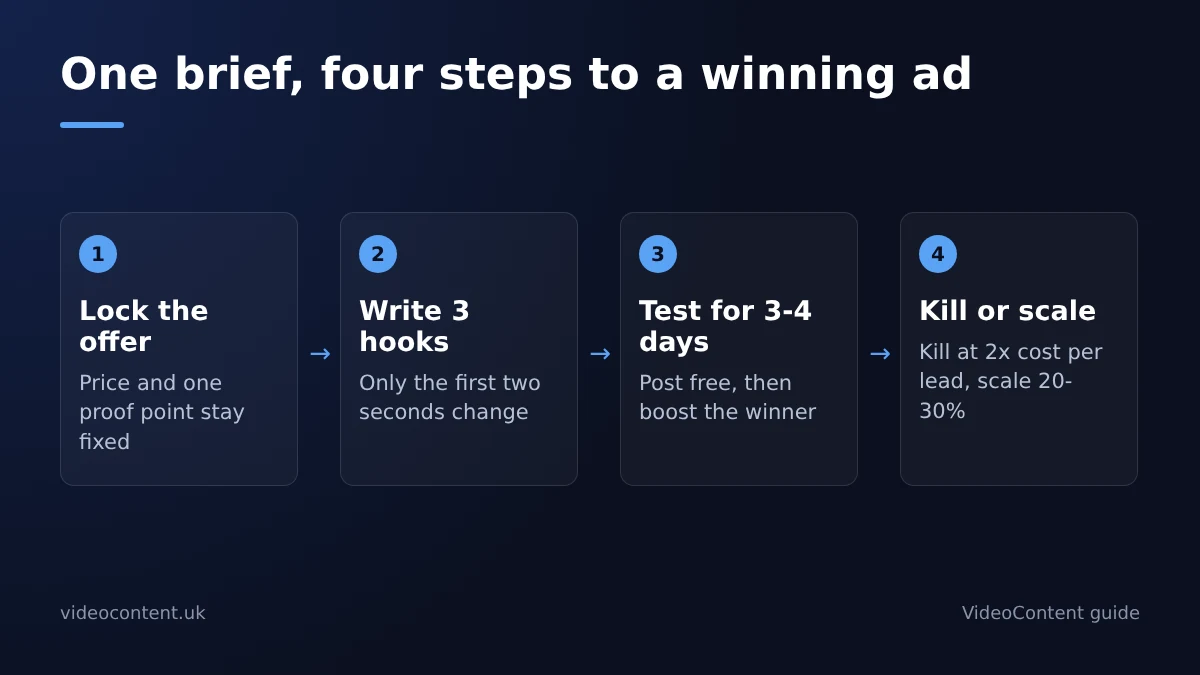
Step 1: lock the offer and proof
Write one sentence: what you're selling, the price or offer, and one proof point (a review count, a before/after, a guarantee). Every variant keeps this fixed. If the offer changes between variants, your test results mean nothing.
Step 2: write three hooks, not three videos
The hook is the first two seconds, and it's where most ad performance lives. Write three: a question ("Still paying $200 for a facial?"), a claim ("We booked 40 appointments from TikTok last month"), and a pain ("Bleach marks on your ceiling? Watch this."). Three hooks times two caption styles already gives you six variants from one brief.
Step 3: generate variants in one session
Paste the same brief into your tool and regenerate with each hook. In VideoContent, one brief plus three hooks produces distinct vertical videos in a single sitting, each with its own voiceover and captions, so you're testing hooks rather than re-briefing. The same logic applies in any tool, as our AI business video tools breakdown explains: identical inputs with one changed variable. Keep the body of the video untouched across variants. If you change the hook and the music and the captions at once, you'll know something won, but never why.
Step 4: export per-platform aspect ratios
Export 9:16 for Reels, TikTok and YouTube Shorts from the same generation. Don't regenerate per platform; reframe and re-caption so the creative stays identical and only placement differs.
How many AI video ad variants should you test per campaign?
Three to four variants per campaign is the right number for a small budget. With $10-20 a day on Meta or TikTok, each variant needs roughly $30-50 of spend before the algorithm has enough data to judge it. More than four variants means none gets enough impressions to read. Generate them from one brief so the test isolates one variable.
When you brief three hooks against the same offer and proof, every difference in performance traces back to the opening two seconds, which is the one variable you can cheaply rewrite tomorrow. Ten loosely related clips teach you nothing usable, because too much changes at once. Three tightly controlled variants leave you with a sentence you can reuse: this hook style, aimed at this pain, beat the alternatives. That sentence becomes the opening of next month's campaign, your email subject line and the first line of your landing page.
Kill rules and scale rules
Kill a variant if its cost per lead is 2x the best performer after 3-4 days. Scale the winner by raising budget 20-30% every two days, not doubling at once, which resets learning. A restaurant owner can brief three hooks in one session and have vertical ads running the same evening.
Weekly cadence for a one-person team
Monday: brief and generate 3 variants. Tuesday through Friday: let them run, check cost per lead once a day, and kill or scale per the rules above. Saturday: spend 30 minutes writing down which hook won and why. That note becomes next week's brief, so each week's test starts smarter than the last.
Which ad formats and aspect ratios does AI video generation support?
Vertical first, then repurpose
Paid placements are vertical-first: TikTok, Reels and YouTube Shorts all take 9:16, and Meta feed ads accept 1:1 or 4:5. Generate in 9:16 once, then export 1:1 crops for feed placements instead of paying for a second render. Most tools in this category handle this, so aspect ratio is rarely the deciding factor.
What matters more is checking before export: safe zones (captions and text must clear TikTok's on-screen buttons), caption styling that survives the crop, and whether the export carries a watermark, which most paid plans remove. Render one 9:16 master, confirm it looks right in the TikTok preview, then cut your 1:1 variants from it.
How do you measure AI-generated video ads against traditional production?
Metrics that matter in the first 3 seconds
Judge AI video ads the same way you judge any ad: hook rate (viewers still watching at 3 seconds), hold rate (average percentage watched) and cost per acquisition. Hook rate is where AI variants earn their keep, because cheap script-and-voiceover variants let you test five hooks instead of betting on one. If a variant dies at 3 seconds, kill it and brief the next one the same day.
Cost and turnaround, honestly framed
AI generation wins on turnaround: a variant goes from brief to export in minutes, and a monthly plan covers the volume most local campaigns need. Agency production still wins on brand polish and original footage of your actual staff and premises. The honest play is a mix: AI variants to find the winning hook, then one well-shot video built around it.
What are the common failure points when using AI video in paid campaigns?
Pricing surprises and credit burn
Credit-based tools can quietly drain a test budget, because every regeneration costs credits. On VideoContent, Standard videos are unlimited on Pro ($19 a month) and Pro+ ($39 a month), and only AI-generated videos use credits (pricing). Whatever you choose, generate one test variant before committing a monthly plan to a campaign.
Watermarks and policy rejections
Free tiers often stamp watermarks, which look unprofessional in a paid placement. Confirm the plan you pay for exports clean 9:16 files. Generic hooks are the other silent killer: ads that open like explainer videos get skipped. Brief the hook first, then A/B three openings against each other. If a platform rejects an ad, rewrite the claim, not the whole video.
How does AI video advertising work for small ad budgets?
Test organically, pay to boost winners
At $10-20 a day you cannot afford to guess. Post each AI-generated variant to your TikTok, Reels and YouTube Shorts accounts for free, and let three or four days of organic data tell you which hook holds attention. Only then put ad spend behind the one or two clips that earned the most watch time. You are paying to amplify a proven winner, not to test blind.
What the free plan and paid plans cover
VideoContent's free plan includes 3 script generations and one watermarked video, with no credit card, enough to test your brief. Starter at $9 a month gives unlimited scripts. Videos start on Pro at $19 a month, and Pro+ at $39 adds scheduled posting, so a batch made on Sunday can run all week without you opening an editor.
FAQ
Can I run AI-generated videos as paid ads on TikTok and Meta, or will they get rejected?
Yes, as long as the creative meets each platform's specs and policies. Most rejections come from things a generator won't catch: text filling too much of the frame, banned claims like "guaranteed results," or the wrong aspect ratio. Check the specs before rendering, and if an ad gets rejected, rewrite the claim rather than the whole video.
Do AI video tools leave a watermark on exported ads?
Free tiers usually do, and a watermark looks out of place in a paid placement. Paid plans typically remove it, so confirm clean 9:16 exports before scaling spend. If you're on a credit-based plan, also check generation limits so your budget doesn't run out mid-campaign.
What's the cheapest AI video tool for making Reels ads for a local business?
Flat monthly plans usually beat credit-based pricing for small budgets. VideoContent's free plan includes 3 script generations and one watermarked video with no credit card, and unlimited Standard videos start on Pro at $19 a month. The bigger saving is the workflow: one brief, three hooks, then boost only the organic winners.
How long should an AI-generated video ad be for TikTok and YouTube Shorts?
Under 30 seconds, in 9:16 vertical. Performance lives in the first two seconds, so write the hook word for word in your brief and test three openings against each other. If a variant dies at the 3-second mark, kill it and brief the next one the same day rather than letting it burn budget.
Do I need to disclose that my ad was made with AI?
Sometimes. Ad platforms have their own rules for AI-generated and digitally altered content, and they are getting stricter, so check the current policy for each platform before launching. Also listen to every voiceover variant before spending: AI narration can mispronounce brand or ingredient names.