Local Business Marketing Ideas: A Playbook by Budget
Key takeaways
- Claiming and completing your Google Business Profile is free, takes about 30 minutes and is usually the best first step.
- Film a short vertical clip at every job and post it to Reels, TikTok and YouTube Shorts; proof of real work beats polish.
- With around £100 a month, spend on a few tools that save time, then put the rest into small, local boosts of your best posts.
- Judge every channel on booked jobs, not likes, and drop any channel that has booked nothing by week 6.
- A three-message follow-up and a referral ask at the moment of praise turn finished jobs into repeat bookings.
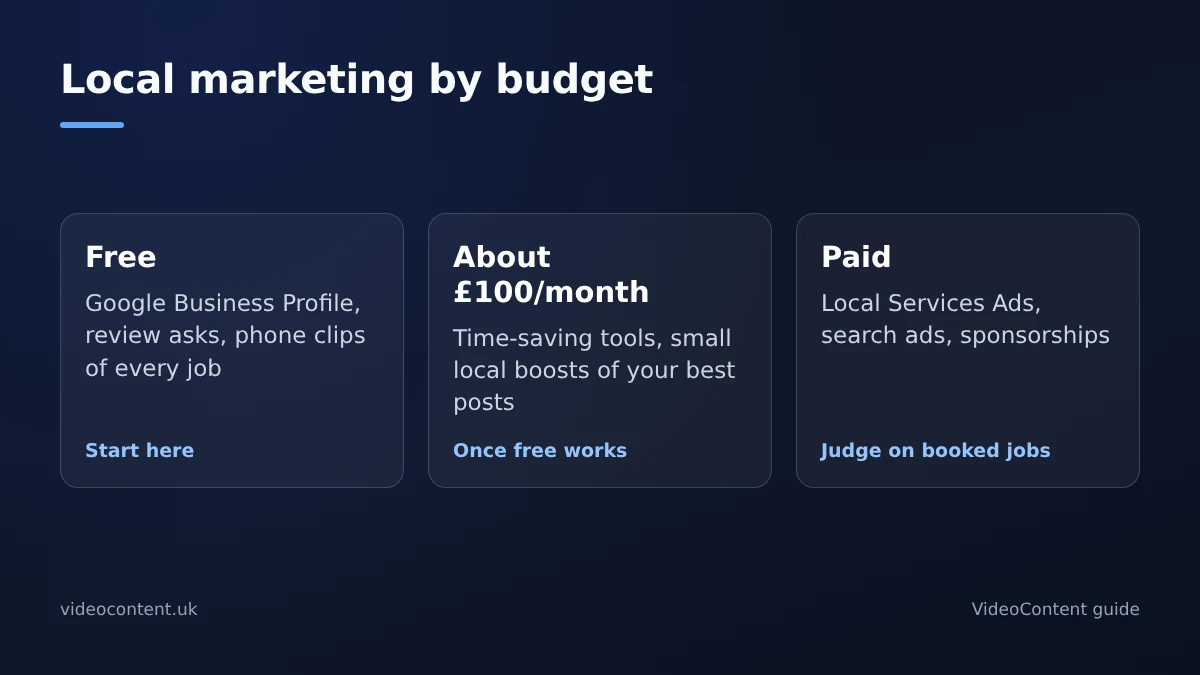
The best local marketing ideas for a 1-10 person business are ones you can run yourself. This playbook sorts them into three tiers: free tactics like your Google Business Profile and phone-shot Reels, a plan for about £100 a month, and paid channels like local search ads. Each idea has clear steps, so you can pick one and start this week.
Which local marketing ideas cost nothing to start?
Every tactic in this section is free and can start today. The catch is that free channels build slowly, so the work is showing up consistently, not finding a trick.
Claim and complete your Google Business Profile (30 minutes)
Google's Business Profile help walks through claiming your profile and adding services, hours, photos and your service area. A complete profile with recent photos gives you a better chance of appearing in map results than an empty one. Reply to every review and add a photo from each job.
Ask for a review at the moment of delivery
The best time to ask is seconds after a customer says "this looks great." Send them your direct review link before you leave. One ask at the right moment beats three emails a week later.
Film one vertical clip per job
Before-and-after clips of real work beat anything staged. Film a few seconds of the before and the after on your phone, add a caption in the app and post it. It doesn't need to be polished; it needs to show you do the work, where your neighbours scroll.
Post in local Facebook groups and Nextdoor
Join the groups for your area and share useful clips there, within each group's rules. Answer questions when people ask for recommendations. That's often where referrals start.
How do you post video every day without editing?
Your own job clips are the best content, but you won't have a good one every day. For the gaps, an AI video generator can make a finished vertical video from a short description, with the script, captions and voiceover done for you. VideoContent works this way: describe your business and today's topic, and it renders a vertical video; a Standard video is finished within 60 seconds. It makes new videos rather than editing your phone footage, so keep posting your own clips alongside.
What to check before picking a tool
- What a failed or rejected generation costs, not just the monthly price.
- Caption and voiceover quality straight out of the tool.
- Whether scheduled posting is included or costs extra.
- Whether the price is flat or credit-based, so you can budget.
How VideoContent compares on those points
| Point | VideoContent |
|---|---|
| Free plan | 3 script generations and 1 video with a small watermark, no card |
| Paid plans | Starter $9, Pro $19 (unlimited Standard videos), Pro+ $39 a month |
| Captions and voiceover | Built in |
| Scheduled posting | On Pro+ (1 platform included; more are an add-on) |
| Weak spot | The free plan is a sample, and it doesn't edit footage you shot |
See pricing for current plans, and our local services page for example videos.
Where CapCut and manual editing still win
CapCut is free and gives you frame-level control. If you enjoy editing or want your real jobs in every video, manual editing wins. A generator wins on speed when you have no footage for the day.
What can a service business do with £100 a month?
A sample split for a 3-person business
- A video tool for the days you have no clip, such as VideoContent Pro at $19 a month.
- A review-request tool, or a simple text template if you'd rather keep it free.
- A basic landing page with your booking link, if your website doesn't already have one.
- Whatever is left goes on small, local boosts of your best posts.
Use each platform's own scheduler (Meta Business Suite, TikTok and YouTube Studio are free) if you don't want to pay for scheduling.
Local boosts: the only paid social worth it at this level
Skip broad campaigns on this budget. Boost your best-performing organic video to a few miles around your postcode, aimed at the age range your customers actually are. A small boost on a strong before-and-after clip beats spreading the same money across a wide area. If your trade is eligible for Google's Local Services Ads, you pay per lead, which can stretch the same money further; check availability for your category and area.
Boosts only work if the video is good. A tool gets you volume; your own before-and-after clips are still the ones that prove the work.
Which paid local channels deliver results fastest?
Search ads and Local Services Ads
These catch people who need you now: someone with a burst pipe searches, sees your ad and calls. Local Services Ads charge per lead and show your Google reviews, so a business with a good review record can start getting calls soon after it's approved. The pitfall is broad keywords, which burn budget fast. Start with your service plus your town.
Local sponsorships and partnerships
Sponsoring a youth team, a fun run or a local podcast pays off more slowly than search, but builds the familiarity that makes later ads work better. Film a short clip at the event to get more from it. Expect months, not days, before this brings leads on its own.
When paid channels waste money
Retargeting and direct mail work best once people already know you. Retargeting a site with a few dozen monthly visitors does little, and mailers to unsorted lists get binned. If you can't say which street or search triggered the spend, pause it and move the budget to search.
What works best for home-service businesses?
Before-and-after and job-site video
Film a few seconds at every job: the problem, the work and the result. Shoot vertical, put a hook in the first two seconds and post the same clip to Reels, TikTok and Shorts. A plumber or roofer who finishes three jobs a day has three videos.
Physical-world reminders
Put a yard sign or sticker on every finished job, because neighbours walking past are your warmest audience. Leave a door hanger on nearby houses mentioning the job you just finished. Fridge magnets with your number last longer than most ads.
Quick versions for other businesses
Salons: transformations. Gyms: member wins, with permission. Med spas: treatment explainers. Restaurants: 20-second dish close-ups. BrightLocal's Local Consumer Review Survey tracks how heavily people rely on online reviews when choosing a local business, so being visible and well reviewed where they search matters more than polish.
How do you turn customers into repeat referrals?
The three-message follow-up
After a job or appointment, send three messages: a thank-you within 24 hours, a check-in after a week, and a reminder tied to their next likely visit at 30 to 60 days. Save them as templates and paste them into text or WhatsApp. It takes about ten minutes a day once it's running.
A referral ask that doesn't feel awkward
Ask when the customer praises the work, not when they pay. When they say "this looks great," reply: "Thank you. If you know one person who'd want this, send them my name and I'll look after them." One specific ask beats a vague "tell your friends."
Win-back messages for quiet customers
Anyone who hasn't booked in 90 days gets one message with a reason to come back this month, such as a discount on their next service if they book by Friday. Keep the offer time-limited and track replies in a simple spreadsheet.
How do you measure whether a channel is working?
Four numbers to track weekly
List every channel in a spreadsheet and log four numbers each Friday: calls, form fills, booked jobs and spend. Your Google Business Profile performance view shows calls from your profile, and Google Ads reports calls from ads. For forms, use a separate booking link or UTM tag per channel so your analytics shows where each came from.
Divide spend by leads to get cost per lead. A poster in the window costs nothing but an hour; a £25 boost that books two jobs is winning. Compare channels on booked jobs, not likes.
When to drop a channel
Give a new channel four weeks before judging it. If it has booked nothing by week 6, or its cost per lead is three times your best channel's, stop and move the money. Recheck the survivors monthly.
FAQ
What is the cheapest way to market a small local business?
Claim and complete your Google Business Profile. It's free and takes about 30 minutes. Add review requests at the moment of delivery and post real job clips in local groups. Free channels build slowly, so consistency matters more than tricks.
Do short-form videos bring in local customers or just views?
They bring customers when the clip shows real work. A short before-and-after from each job, posted to Reels, TikTok and Shorts, proves you do the work to people nearby. Judge the channel on booked jobs, not likes.
How much should a small service business spend on marketing each month?
Around £100 a month is enough to start for a 3-person business: a couple of time-saving tools, then small local boosts of your best posts. Track calls, form fills and booked jobs weekly, and cut any channel that books nothing by week 6.
Is Google Business Profile really free?
Yes. Setup takes about 30 minutes: claim the profile, add services, hours, photos and your service area, then reply to reviews and add photos from each job. Its performance view shows how many people called from your profile.
Which AI video tool suits a business with no editor?
One that makes a captioned, voiced vertical video from a short description, with flat pricing. VideoContent's free plan gives 3 script generations and 1 watermarked video; paid plans are $9, $19 and $39 a month, with scheduling on Pro+. It makes new videos rather than editing your footage.