Real Estate Video Marketing: Templates vs AI vs Pros
Key takeaways
- Match the video method to the listing: DIY templates for rentals and mid-market homes, a videographer for luxury listings, AI generation for market updates and daily presence videos.
- Listing videography typically runs $150-600 per video, so ten listings in a month can cost $1,500-6,000 before revisions.
- Before paying for an AI video tool, check whether it charges a flat monthly fee or meters credits per video, and what happens when you go over your plan.
- A sustainable cadence is four 30-60 second vertical videos per active listing per week, batched and scheduled to YouTube Shorts, TikTok, Instagram and Facebook.
- On VideoContent, a solo agent can start at $19/mo for unlimited standard videos, $39/mo to add scheduled posting to one platform, or $79/mo to post to all four.
Real estate video marketing works best when you match the method to the listing: DIY templates for rentals and low-price listings, a hired videographer for luxury properties, and AI-generated video for the market updates and short-form clips that keep your brokerage visible between listings. This guide gives you the cost, turnaround, and listing-type comparison to pick per listing, plus a worked 10-listing monthly budget.
What is real estate video marketing and which videos actually move listings?
Real estate video marketing is using video to sell listings and to keep your name in front of local buyers and sellers. It splits into two jobs with different budgets: videos about a property, and videos about you.
Listing videos vs presence videos: two jobs, two budgets
Listing videos are walkthroughs of a specific property. They support a sale and justify a per-listing spend, whether you shoot them yourself or pay a videographer. Presence videos are neighborhood shorts, market updates and promo videos for your brokerage. They exist so sellers pick you before the listing exists, so they need to post every day on a budget that survives months, not one listing.
Why short-form vertical video is the default now
Buyers browse listings on their phones, and vertical video is what those feeds show. That makes YouTube Shorts, TikTok, Instagram and Facebook the shelf space that matters. Tools like VideoContent exist so a market-update short gets written, narrated, and posted without you opening an editor.
DIY templates, hired videographers, or AI: which method fits which listing?
Three production methods cover real estate video marketing: DIY templates, a hired videographer, and AI-generated video. The right pick depends on the listing and how much time you have.
When a hired videographer is worth it
Luxury listings justify the spend. A $2M+ home sells on lifestyle, and buyers expect drone footage, gimbal walkthroughs, and golden-hour shots. Book a half-day shoot, pay per listing, and reuse the footage across YouTube Shorts and Instagram.
When real estate marketing video templates are enough
Mid-market homes and rentals rarely need custom production. A template with your photos, price, and three selling points, rendered as vertical video with captions, does the job. So does a reminder the day before an open house. The constraint is you: templates still need someone to assemble them.
When AI-generated video wins
Daily neighborhood clips, blog-post-to-video recaps of market updates, and promo videos for a brokerage all suit AI generation. It writes, narrates, and renders without you editing anything, then handles scheduled posting. See the AI video generator for real estate, or the same workflow in another niche: AI video generator for restaurants.
How do the three methods compare on cost, turnaround, and listing type?
| Method | Cost per listing | Turnaround | Best-fit listing |
|---|---|---|---|
| DIY templates | Your hours, plus any template tool | A few hours per video | Rentals, price drops, open-house announcements |
| Hired videographer | $150-600 per video | Days; rush delivery costs extra | Luxury listings, new developments |
| AI-generated video | $19-39/mo flat for standard videos on VideoContent | Under 60 seconds for a standard video | Market updates, neighborhood shorts, blog-post recaps |
Videographer rates are from Fash's real estate videography pricing guide, which lists $150-400 for a short highlight reel and $250-600 for a walkthrough. All three methods should output vertical video, since YouTube Shorts, TikTok, Instagram Reels, and Facebook Reels all favour 9:16 formats (YouTube Help).
Worked example: a 10-listing month on each method
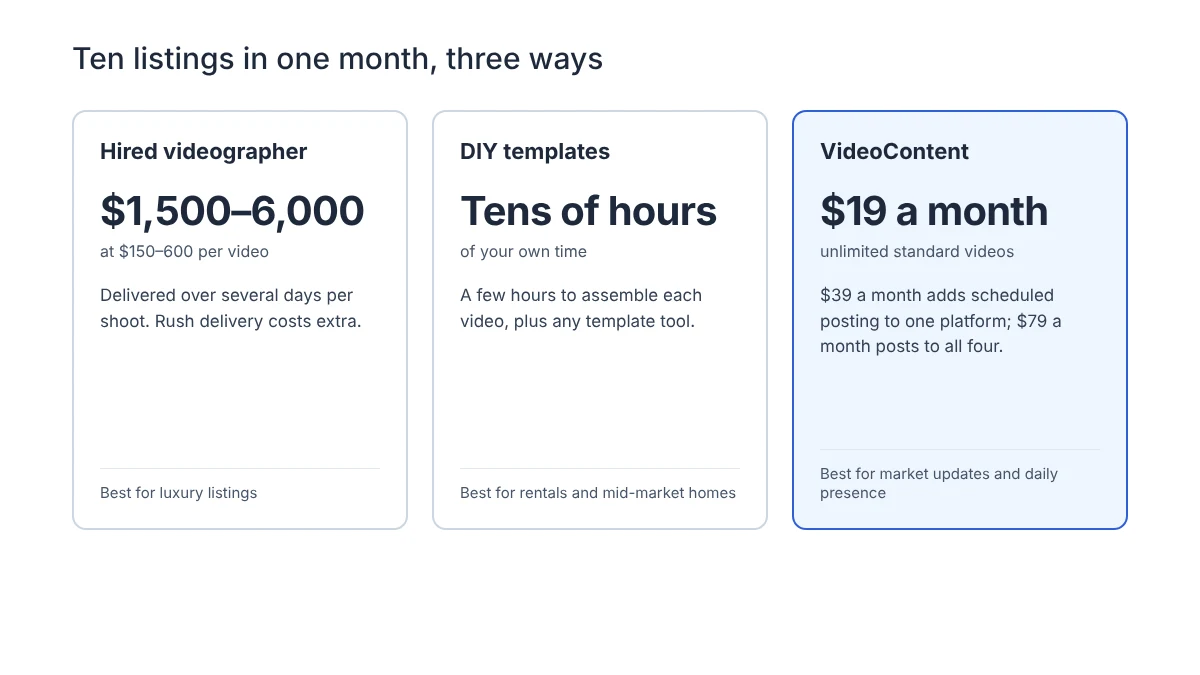
Ten listings with a videographer: roughly $1,500-6,000 at those rates, plus scheduling around shoots. With DIY templates: tens of hours of your time you will not get back. With VideoContent Pro at $19 a month, every listing gets a promo short the same day, and Pro+ at $39 a month posts them on schedule to one platform, or $79 a month to all four.
Hidden costs: revisions, reshoots, and credit pricing
Reshoots and revision rounds are where videographer budgets break. Credit-based AI tools carry a different risk: the real cost of a video depends on the credit price and how many tries a usable clip takes. On VideoContent, standard videos are unlimited on Pro and Pro+, and only AI-generated videos use credits, charged by the length of the video. Whichever tool you pick, check what happens when you exceed your plan.
What should you check before paying for real estate video marketing services?
Judge any service or tool on five things: output quality, per-video cost, turnaround, platform coverage, and pricing stability. Ask for finished vertical video samples from your niche, not a demo reel. Work out the real per-video price, including credits, revisions, and music or voiceover fees. A listing video you get in 48 hours is worth more than a cheaper one you get in a week.
Pricing stability: flat fees vs credits
Before you commit, check whether pricing is a flat monthly fee or a metered balance, whether the plan caps how many videos you can render, and whether the provider can change what a credit costs. A flat fee is easier to defend in a budget review.
Platform coverage: YouTube Shorts, TikTok, Instagram, Facebook
Confirm the tool renders vertical video and posts to YouTube Shorts, TikTok, Instagram, and Facebook directly. Scheduled posting matters more than raw output: a channel that posts every day on autopilot beats a tool that dumps files in your downloads folder. Our own AI video generator for agencies follows the same checklist: AI writes, narrates, and renders each video, then posts on schedule to one platform on Pro+, or to up to all four with a posting bundle.
How do the main AI video tools compare for agents?
The honest answer depends on which job you mean. Captioning-first tools like Submagic and OpusClip start from footage you already have; faceless-channel tools like AutoFaceless and ShortGenius generate videos from nothing; quso.ai sits in between. Agents should match the tool to the listing type, not the other way round.
VideoContent runs through the same checklist. It writes, narrates and renders short-form vertical video from your business details, or with Blog to Video from a blog post or a pasted listing description, then posts on schedule. Business videos post to YouTube Shorts, TikTok, Instagram and Facebook; Blog to Video posts to YouTube, Facebook and Instagram. On cost, Pro is $19/mo for unlimited standard videos, Pro+ is $39/mo with scheduled posting to one platform, and $79/mo posts to all four, per VideoContent's pricing; Blog to Video has its own plans from $7.99/mo. Where it is not the right fit: if you need a talking-head agent on camera for a luxury listing, none of these replaces a hired videographer. If you already film walkthroughs on your phone and only need them cut into captioned shorts, Video to Shorts or a captioning-first tool does that job.
The practical way to decide is to run a two-week trial with your own material rather than trusting demo reels. Take one active listing, one recent market update, and one neighborhood post you already wrote, and feed each through the two or three tools on your shortlist. Judge the output on three things only: whether the narration sounds like something a buyer would watch past the first five seconds, whether the captions render correctly on a phone screen, and whether the tool can post to your channels without a manual upload step. Whatever survives that test at the lowest flat monthly price is the right tool for your volume, and you will have real evidence for the budget line item.
How do you build a weekly video schedule you will actually keep?
A 4-video week from one listing
Pick a cadence you can hit in under an hour a week. For one active listing, that is four vertical videos: a promo video opening the listing, an open-house reminder the day before, a feature short on the kitchen or yard, and a neighborhood clip. Each is one short-form video, 30-60 seconds, captions and hashtags included. Two listings? Double the output or post each listing's four videos across two weeks.
Scheduled posting vs posting when you remember
The bottleneck is never filming a 30-second clip on your phone. It is editing, captioning, and uploading to YouTube Shorts, TikTok, Instagram, and Facebook, four times, every week. Scheduled posting removes that step: you batch the videos Monday morning, the queue posts them on autopilot, and a missed showing never means a missed post. That is why VideoContent prices scheduled posting as its own tier: $39/mo on Pro+, versus $19/mo for finished videos alone.
What does a first month of real estate agent video marketing cost?
Start free. VideoContent's free plan includes up to three generations, so you can see whether the output suits your listings before spending anything.
Solo agent with a handful of active listings: Pro at $19/mo covers unlimited standard videos that you post yourself. A brokerage running neighborhood-update shorts alongside listing videos: Pro+ at $39/mo adds scheduled posting to one platform, and posting bundles cover two, three or all four platforms at $59, $69 or $79 a month, so videos go out on YouTube Shorts, TikTok, Instagram and Facebook without anyone touching an editor.
Matching the tier to your listing volume
Roughly: if you are happy to post by hand, Pro. If you want videos to post themselves to your main platform, Pro+. To cover all four platforms on autopilot, the $79 bundle.
How do you turn blog listings and market updates into video without editing?
Faceless market-update shorts
Market updates are the easiest faceless videos to run. For example: "3 homes sold in Maplewood this month, median $612K, here's what that means for buyers." Blog to Video writes the script from your blog post, narrates it, adds captions, and renders a vertical short. You review, post, repeat. A weekly update takes minutes, not an editing session, and it positions you as the agent who knows the numbers.
From listing description to narrated video
Your listing description already contains the walkthrough: "open-plan kitchen," "fenced yard," "five minutes to the station." Paste it into Blog to Video and it becomes a scene plan you can edit line by line, then a narrated vertical video with captions, ready to post on schedule. If you want captions-only editing of footage you already shot, Video to Shorts, Submagic, OpusClip, or quso.ai fit better; for fully generated faceless channels, AutoFaceless and ShortGenius are other options.
FAQ
How much should a real estate agent spend on video marketing per month?
A solo agent can run on $19/mo for unlimited standard videos on VideoContent Pro, while brokerages wanting scheduled posting should budget $39/mo for one platform or $79/mo for all four. Hiring a videographer instead typically runs $150-600 per video, so ten listings in a month could cost $1,500-6,000 before revisions.
Can AI make listing videos that look professional, or do I still need a videographer?
For luxury listings, book a videographer: buyers at that price point expect drone footage, gimbal walkthroughs, and golden-hour shots. For mid-market homes, rentals, open-house reminders, and market updates, AI-generated vertical video with captions and narration is professional enough. Match the method to the listing price rather than defaulting to one option.
What is the fastest way to get a listing video online the same week?
Paste your listing description into an AI video tool such as Blog to Video: it turns the text into a narrated script, renders a vertical short with captions, and can post it the same day. DIY templates take a few hours per video, and videographers usually need several days.
Do I need to be on camera for real estate video marketing to work?
No. Faceless formats work well for market-update shorts, neighborhood clips, and narrated videos built from your listing descriptions or blog posts. The AI writes and narrates the script, so your voice never appears. Being on camera helps build a personal brand, but a daily posting cadence matters more than showing your face.
Which platforms should agents post real estate videos to first?
YouTube Shorts, TikTok, Instagram Reels, and Facebook Reels, in vertical 9:16 format, since buyers browse on mobile. Rather than picking one, batch your videos and use scheduled posting to cover all four. Posting daily across all four beats perfecting a single channel you update whenever you remember.