How to Post Consistently on Social Media Without a Designer
Key takeaways
- Pick a posting number you can keep for three months, not the one that sounds impressive.
- Three or four content themes stop the weekly "what do we post?" problem.
- Plan the whole week in one sitting, then approve it in one sitting.
- A fixed template (colours, two fonts, logo spot) removes most of the design work.
To post consistently on social media, decide how many posts a week you can keep up, plan the whole week in one sitting, and make every post from the same template. Most small businesses don't stop posting because they run out of things to say. They stop because every post is a fresh decision: what to say, what it should look like, and when it goes out. This guide removes those decisions one at a time.
Why do small businesses stop posting?
Posting usually stalls for one of three reasons. Ideas run dry, because nobody decided in advance what the account is about. Design takes too long, because each post starts from a blank canvas. Or posting depends on one busy person remembering on the day. Each fix below targets one of those.
| Why posting stops | The fix |
|---|---|
| No ideas on the day | Three or four content themes, decided once |
| Each post takes an hour to design | One template in your colours and fonts |
| Someone has to remember | Plan and schedule the week ahead |
Step 1: Set a number you can keep
Choose the number of posts a week you could keep up through your busiest month, then start there. Three posts a week on one or two platforms is a sensible starting point for most local businesses. An account that posts three times a week for a year looks more alive than one that posts daily for three weeks and then goes quiet.
Pick platforms by where your customers already are, not by where you feel you should be. If you can only keep one platform going, keep one going well.
Step 2: Pick three or four content themes
Content themes (sometimes called pillars) are the few subjects your account covers again and again. With themes in place, "what do we post this week?" becomes "what's this week's tip, offer and behind-the-scenes post?", which is a much easier question.
| Business | Theme 1 | Theme 2 | Theme 3 |
|---|---|---|---|
| Bakery | This week's bake | How it's made | Orders and opening hours |
| Plumber | Quick home tips | Jobs we finished | When to call a pro |
| Hair salon | Before and after | Care tips | Booking and offers |
| Accountant | Deadlines coming up | Common mistakes | Who we help |
Rotate through them so no theme runs twice in a row. If you sell something, give one theme to offers and keep the others useful. A feed that's all offers reads like an advert.
Step 3: Plan the week in one sitting
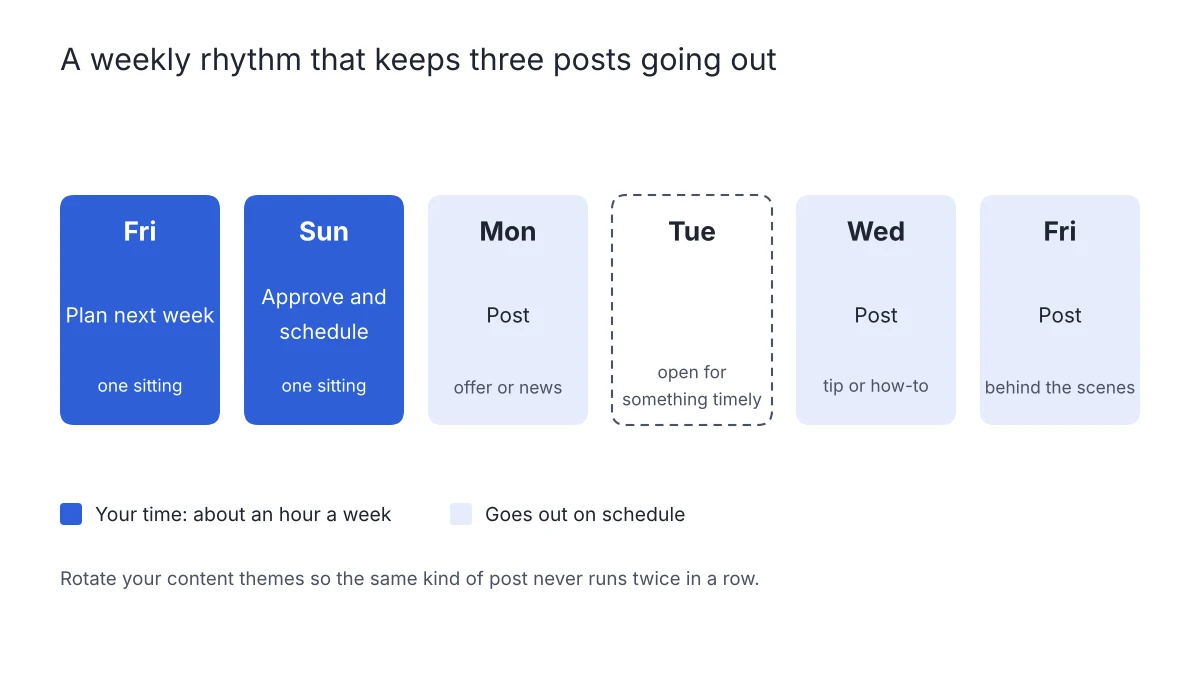
Planning post by post is what eats time. Block 30 to 45 minutes once a week, on the same day, and plan everything for the week ahead.
- Pick a topic for each post slot from your themes.
- Write the headline that goes on the image: one idea, a few words.
- Write the caption, and change it for each platform where needed.
- Choose the format: single image, carousel or video.
- Set the day and time for each post.
Step 4: Design once and reuse it
A template does most of the design work for you. Fix your colours, two fonts and where the logo sits, then make every post from the same few layouts. People start to recognise your posts in their feed before they read the name, and each new post takes minutes instead of an hour.
Make images in Instagram's portrait size, 1080 by 1350 pixels (a 4:5 ratio). It takes up more of the screen than a square (IONOS size guide). Keep headline text large and in strong contrast with its background; the web accessibility guidelines ask for at least 4.5 to 1 for normal text (W3C). Our guide to building a social media brand kit covers choosing colours and fonts.
Step 5: Approve and schedule in one go
Review the whole week at once, fix what's off, and schedule it. Leave one slot open for something timely, like a new product, a local event or a quick reply to a customer question. That keeps the feed feeling current without breaking the plan.
Once a month, look at which posts got the most comments and saves, and tilt next month's themes towards them.
Can a tool plan the week for you?
Yes, and that's what we built Brand Studio to do. You give it your website. It drafts a brand profile and content themes for you to check, picks up your colours and logo, and plans each week's posters, carousels and videos in your fonts and words. You approve the week, or reject a post with a reason, and it posts on schedule to Instagram, Facebook, TikTok and YouTube. If you'd rather not approve every week, you can turn on autopost.
The free plan builds your brand profile and themes, and gives you one week of five posters to download (with a watermark). Paid plans start at $29 a month and post for you; see plans.
FAQ
How often should a small business post on social media?
As often as you can keep up for months. Three posts a week on one or two platforms is a realistic start for most small businesses. Raise it once that feels easy.
Can I post the same thing on every platform?
You can reuse the image or video, but adjust the caption. A caption that works on Instagram can read oddly on Facebook, and hashtags matter more on some platforms than others.