Free AI Video Generator With No Restrictions: What's Real in 2026
Key takeaways
- "No restrictions" hides four separate limits: watermarks, export caps, commercial-use terms and script-to-video support. Check each one.
- No-signup tools are fine for a one-off test, but you lose saved projects, scheduling and usually clean exports.
- Search a tool's terms for "commercial", "license" and "monetize" before your first post; a business account counts as commercial use.
- Free editors like CapCut give clean exports but no generation; generators usually watermark free output because removing it is what you pay for.
- VideoContent's free plan is 3 script generations plus 1 watermarked video, and its terms say you own what you generate on every plan.
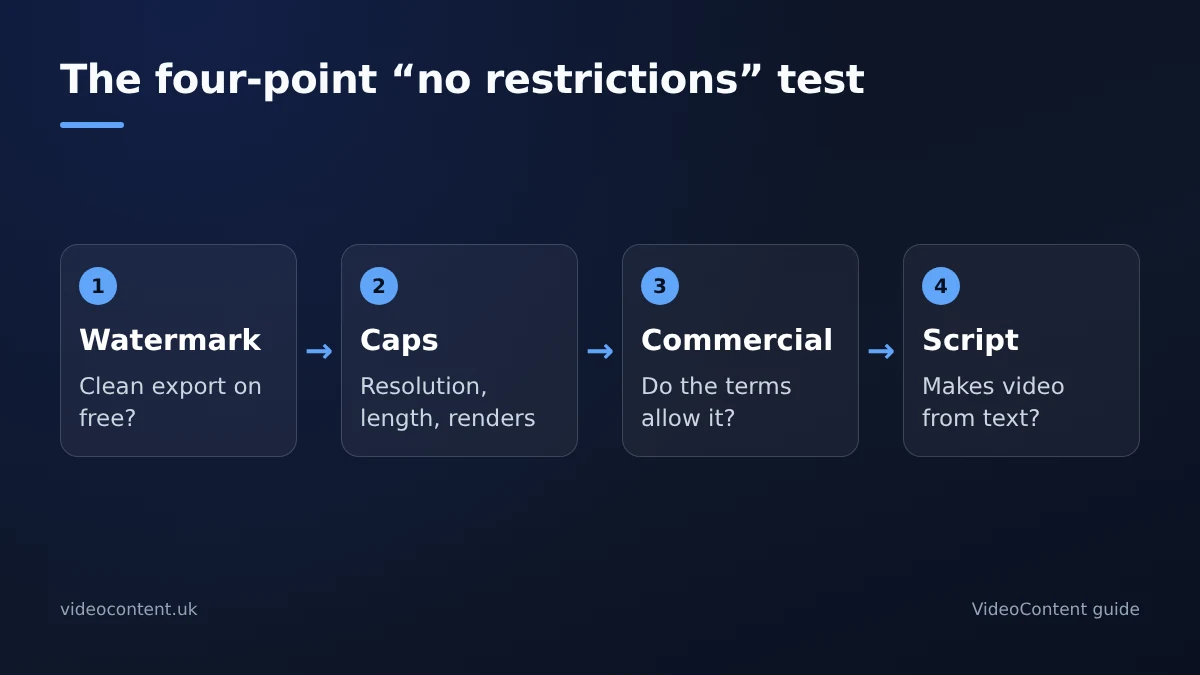
Most "free AI video generator with no restrictions" claims fail a four-point test: no watermark, no export cap, commercial-use rights and script-to-video support. This guide gives you that checklist, explains where free tiers usually stop, and shows where our own free plan stops too.
What does "no restrictions" actually mean?
There are four separate limits to check. Watermarks: most free tiers stamp a logo on exports, which looks out of place on a salon or gym account. Export caps: resolution, video length or the number of renders per month. Commercial-use terms: some tools license free output for personal use only. Script-to-video support: many tools only re-cut footage you already have, which doesn't help if you have none.
Why free and unrestricted are separate claims
A tool can be free and restricted, or paid and still watermark some exports. Limits usually live on the pricing page and in the terms, not the homepage. For example, Submagic's pricing lists what its free plan includes; read that page rather than a "100% free" headline.
What do you give up with a no-signup tool?
A few browser tools will turn a prompt into a short clip without an email address. They're useful for a quick test. The catch comes after the render: the project usually disappears when you close the tab, exports are often lower resolution or watermarked, and nothing is saved, so there's no library, no presets and no scheduling.
When to create the account
Sign up once you want saved projects, scheduled posting and clean exports. Anonymous tools are for sampling; accounts are for posting every week. If you post Reels for a salon five days a week, starting from scratch every morning isn't a workflow.
How do you check commercial-use rights before you publish?
- The terms of service. Search for "commercial", "license", "ownership" and "monetize".
- The pricing page. If free output is "personal use only" while paid plans mention business use, that's your answer.
- The assets inside the video. Templates, stock clips, music and AI voices can each carry their own license. CapCut's terms and asset labels are worth reading before you use its templates or music in business posts.
Do this before your first post, not after a takedown notice. A restaurant posting Reels is commercial use, even from a free account.
Red-flag phrases
"Personal, non-commercial use only" and "license granted for individual use" mean the free export isn't safe for a business account or client work. Silence counts too: if the terms never mention commercial use, don't assume you have it.
The same test on our own tool
VideoContent's terms say you keep ownership of the videos you generate, on every plan, and they don't ask for attribution. You're still responsible for making sure what you publish is accurate and follows each platform's rules.
Which hidden limits sit behind "unrestricted" tools?
| Tool type | Typical free watermark | Makes video from a script? | Commercial use on free |
|---|---|---|---|
| Free editors (CapCut) | Usually none on standard exports | No, you edit your own footage | Check each template and track |
| Caption and clipping tools (Submagic, OpusClip, quso.ai, SendShort) | Usually yes | Mostly no, they need footage or a long video | Check the terms per plan |
| VideoContent | Yes, a small mark on the free video | Yes | Terms say you own your videos on every plan |
The pattern: free editors give clean exports but no generation, while generators watermark free output because removing it is the upgrade. Pricing and caps change, so check the plan page the week you sign up.
Where VideoContent's free plan stops
The free plan includes 3 script generations with captions and hashtags, plus one Standard video with a small watermark, and no card. That's enough to judge quality, not to post daily. Starter at $9 a month removes the watermark, Pro at $19 adds unlimited Standard videos, and scheduled posting is on Pro+ at $39 (pricing).
Which free tools turn a script into a finished video?
Script-to-video vs repurposing
Submagic, OpusClip, quso.ai and SendShort mostly work from footage or long videos you already have. CapCut is a manual editor with AI assists. If you have a script and want a finished vertical video without an editor, you need a script-to-video tool. VideoContent is built for that: describe your business or paste a hook, and you get a captioned video with a voiceover; a Standard render finishes within 60 seconds. If you already have long recordings, a repurposing tool is faster.
What good output includes
Captions burned in, because many people watch with the sound off. A voiceover that sounds natural. And a hook in the first two seconds. If you have to assemble those pieces yourself, the tool hasn't saved you the editing work.
This matters on YouTube in particular. It asks creators to disclose realistic altered or synthetic content, and its monetization policies reject mass-produced, near-identical uploads. Varied scripts and hooks keep each video original. Agencies producing for clients can see how this works on our agencies page.
Free tool or paid plan: how should a small business choose?
Match the tool to how often you post
A one-off post, like a holiday special, can live with a watermark or lower resolution. Posting to Reels, TikTok and Shorts every week needs scheduling, consistent branding and terms you've read, which is what paid plans are for. Client work raises the bar again, because personal-use-only free tiers fail on licensing alone.
Flat price vs credits
On credit plans, a rejected render usually costs the same as one you keep. Work out the cost per finished video, retries included. When your volume is predictable, a flat monthly price is easier to budget.
A safe workflow for free AI video output
- Write the hook and script in a plain document first, so the text is yours before any tool touches it.
- Generate the video and check the export: watermark, resolution and length.
- Confirm commercial use in the terms before you post. If free output is personal use only, upgrade or use another tool.
- Upload natively to Reels, TikTok and Shorts rather than reposting a file with another app's watermark.
- Batch next week's videos in one sitting and schedule them, so posting survives a busy week.
Keep a dated copy of the terms for client work
Save a screenshot or PDF of the terms and pricing page on the day you make each client video. Terms change, and a client asking "can I run this as an ad?" deserves a dated answer.
FAQ
Is there a truly free AI video generator with no watermark?
Free editors like CapCut usually export without a watermark, but they don't generate the video. Most generators watermark free output, including VideoContent's free video. Check each tool's plan page when you sign up, because limits change.
Can I use free AI-generated videos on my business TikTok?
Only if the tool's terms allow commercial use on your plan. Search the terms for "commercial", "license" and "monetize", and check the license of any music or templates. On TikTok, business accounts should use the Commercial Music Library.
Do I need a paid plan to post AI videos commercially?
It depends on the tool's terms, not on whether you pay. VideoContent's terms say you own the videos you generate on every plan. Other tools may limit free output to personal use, so read their terms before posting.
What's the catch with AI video tools that need no signup?
Your project usually disappears when you close the tab, exports are often watermarked or lower resolution, and nothing is saved: no library, presets or scheduling. They're fine for a quick test, not for weekly posting.
Which AI video generator suits someone who writes their own scripts?
A script-to-video tool rather than a clipping tool. Submagic, OpusClip, quso.ai and SendShort mostly re-cut existing footage. VideoContent turns a script or hook into a captioned vertical video with a voiceover.