Faceless Video AI Generator Free Download: 2026 Options
Key takeaways
- Faceless video AI generators run in the browser, so a free download means exporting an MP4, not installing software.
- CapCut's free desktop app is the one common install, but it edits footage you supply rather than generating videos.
- Free tiers usually mean a handful of generations, a watermark and lower priority; check each tool's current plan page.
- Before posting to a monetized channel, check three layers: the tool's terms, the stock footage and music, and the AI voice.
- A free tier suits testing; daily posting across Reels, TikTok and Shorts needs a paid plan.
Yes, you can get a faceless video from an AI generator for free in 2026. But "download" usually means exporting an MP4 from a browser tool, not installing software. Expect a few free generations with a watermark, and check the license before posting to a monetized YouTube or TikTok channel. This guide covers what's genuinely free, a copyright checklist and a walkthrough for your first video.
Is there a real free download, or only free trials?
Almost none of these tools are downloads. Faceless generators and caption tools like Submagic, OpusClip, quso.ai and SendShort run in the browser: you sign up, get limited free use, and export from a web page. VideoContent works the same way. What you can actually install is a desktop editor, and that changes what "free" means.
| Tool | Install anything? | What it does |
|---|---|---|
| Submagic, OpusClip, quso.ai, SendShort | No, browser only | Captions or cut-downs of footage you supply; some generate |
| CapCut | Yes, desktop and mobile app | Manual editor for your own footage |
| VideoContent | No, browser only | Generates script, captions and a vertical video |
What CapCut's free app covers
CapCut's free app handles editing, captions and exports, but it doesn't write or generate the video for you. Check CapCut's site for which features are free today, because some AI features and assets sit behind its paid plan. Browser generators do the opposite: they produce the video from a prompt, then you download the MP4.
What does "free, no copyright" mean for monetized channels?
"No copyright" claims only protect you if every layer of the video is cleared for commercial use. Check three layers.
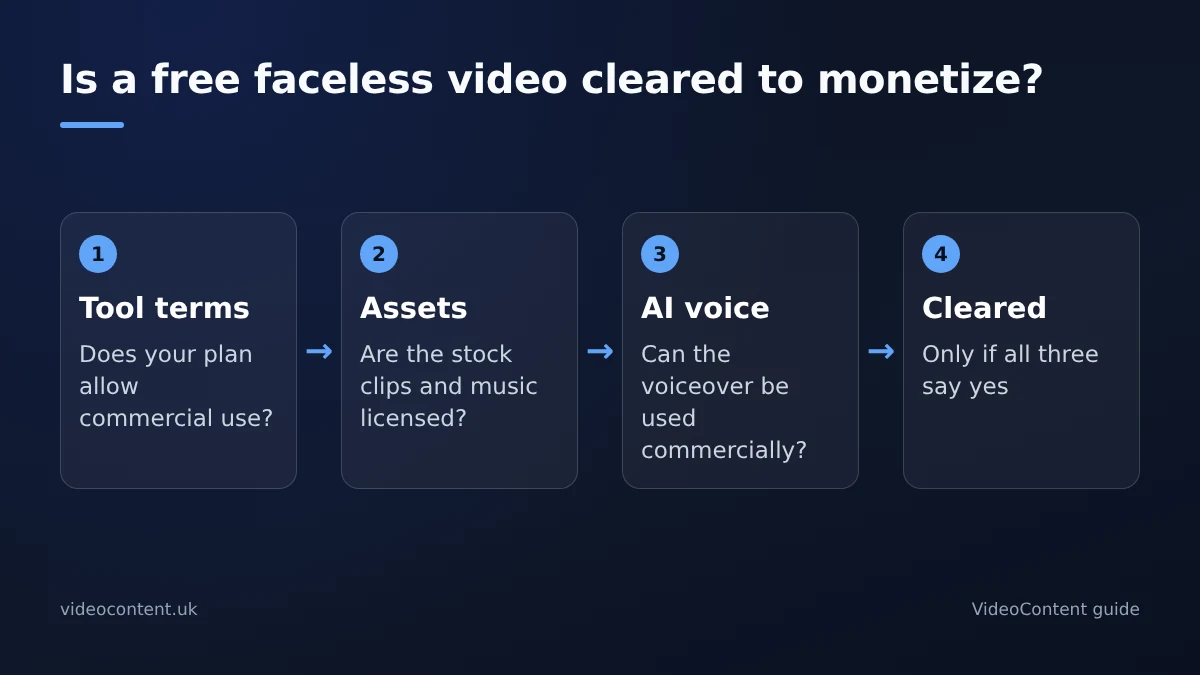
Three license layers
- The tool's terms. A free tier may let you download but limit commercial use. Search the terms for "commercial", "license" and "ownership".
- The assets inside the video. Stock clips, images and music each carry their own license, and some free stock excludes advertising or monetized use.
- The AI voiceover. Check whether the voice can be used commercially on your plan and whether the tool claims rights over outputs.
If all three say commercial use is fine, you're clear. If one is silent, assume it isn't until you confirm. On TikTok, business accounts must use audio from the commercial music library rather than any trending sound.
Why watermark-free export is usually paid
Most free tiers stamp a watermark on exports, because it keeps the tool visible while you test. Removing it is usually the first thing you pay for. VideoContent follows the same pattern: the free plan's video carries a small mark, and Starter removes it (pricing).
Can you use free faceless AI videos commercially without attribution?
Often yes, but only because a tool's terms say so, not because the tier is free. Attribution requirements are rare in this category; personal-use-only clauses are not. Read the terms, confirm your plan covers business accounts, and keep a copy of what you agreed to.
For our own tool: VideoContent's terms say you keep ownership of the videos you generate, on every plan, and they don't ask for attribution. You're still responsible for checking that what you publish is accurate and follows each platform's rules.
Which free-tier limits should you expect?
Most free tiers give you a small number of generations, a watermark on exports and lower priority in the render queue. Some cap resolution or clip length too. Limits change often, so check each tool's plan page on the day you sign up.
Where VideoContent's free plan falls short
The free plan includes 3 script generations with captions and hashtags, plus one Standard video with a small watermark. No credit card is needed. That's a sample, not a workflow: unlimited Standard videos start on Pro at $19 a month, and scheduled posting is on Pro+ at $39. If you run a restaurant, one free video shows you the output; a week of posts needs a paid plan.
Where other free tiers fall short
Caption and clipping tools need footage you already have. Credit-based generators can run out after a few renders. Manual editors are free but cost you editing time. Whatever you pick, read the license before posting to a monetized channel, because "free download" rarely means "free to monetize".
How do you make and download your first faceless video for free?
Step 1: pick your niche and hook
Sign up and describe your business. Your hook is one line: "Why your gym membership is a subscription you forget to cancel" beats "Welcome to our gym". VideoContent has starting points for gyms, restaurants, med spas and other local businesses.
Step 2: generate the script and captions
Check the script before you render. If it gets your price or location wrong, fix the text first. With a single free video, spend your effort on the hook, not on a clip you already know is wrong.
Step 3: export the MP4
Render and download the vertical MP4 straight from the browser. There's nothing to install. On the free plan the video carries a small watermark.
Step 4: post it
Upload natively to TikTok, Reels or Shorts. If you plan to monetize on YouTube, keep each video original: YouTube's monetization policies reject reused and mass-produced, near-identical videos. Varied scripts and your own voice or commentary help.
When is free enough, and when do you need a paid plan?
The daily posting math
A free tier covers a test. Most local businesses that commit want three Reels, three TikToks and three Shorts a week, which is nine uploads. You can reuse one video across all three platforms, but even three new videos a week runs past any free tier quickly.
A simple test: if you'd pay a freelancer $50 to edit one video, a monthly plan pays for itself after the first one or two.
When agencies and faceless channels should upgrade
If you post daily for several locations or run a faceless channel, pay for the plan that removes your real bottleneck: watermark, volume or scheduling. If you're still testing whether short video works for your business, stay free until a clip brings in a booking. Our faceless channel tools comparison covers the options side by side.
FAQ
Do I need to credit the AI tool when I post on my business TikTok?
Usually not. Attribution requirements are rare in this category. What matters is whether the tool's terms allow commercial use on your plan. Search the terms for "commercial", "license" and "attribution" before posting from a business account.
What's the catch with free AI video tiers that don't need a credit card?
The limits, not the card. Expect a few free generations, a watermark on exports and lower render priority. Some tiers also limit commercial use. VideoContent's free plan gives 3 script generations and one watermarked video, with no scheduling.
Can I install a faceless video AI generator on my computer for free?
Rarely. The generators in this category are browser tools where "download" means exporting an MP4. CapCut's free desktop app is the common install, but it edits footage you supply rather than generating videos from a prompt.
Are AI-generated faceless videos allowed on monetized YouTube channels?
Yes, if each video is original. YouTube allows AI tools but rejects reused content and mass-produced, near-identical uploads. Vary your scripts, visuals and hooks, and make sure every asset in the video is licensed for commercial use.