How to Create a Faceless AI YouTube Channel That Can Be Monetized
Key takeaways
- To join the YouTube Partner Program you need 1,000 subscribers plus 4,000 public watch hours in 12 months or 10 million public Shorts views in 90 days.
- YouTube doesn't ban AI voiceovers or faceless formats. Channels get rejected for mass-produced, repetitive videos nobody reviewed.
- You can start for almost nothing: a free plan to test scripts and a first video, plus a free editor like CapCut.
- Disclose realistic altered or synthetic content when you upload; stylized or obviously artificial videos usually don't need it.
- Affiliate links, sponsorships and your own products usually pay before ad revenue does, so treat ads as a bonus.
You can set up a faceless AI YouTube channel in a weekend: pick a niche, use AI for scripts and voiceovers, make vertical videos without editing by hand, and post on a schedule. The hard part is staying on the right side of YouTube's reused and inauthentic content rules while you work toward 1,000 subscribers and 4,000 watch hours or 10 million Shorts views. This guide covers setup, tools, the policy line and realistic timelines.
What is a faceless AI YouTube channel?
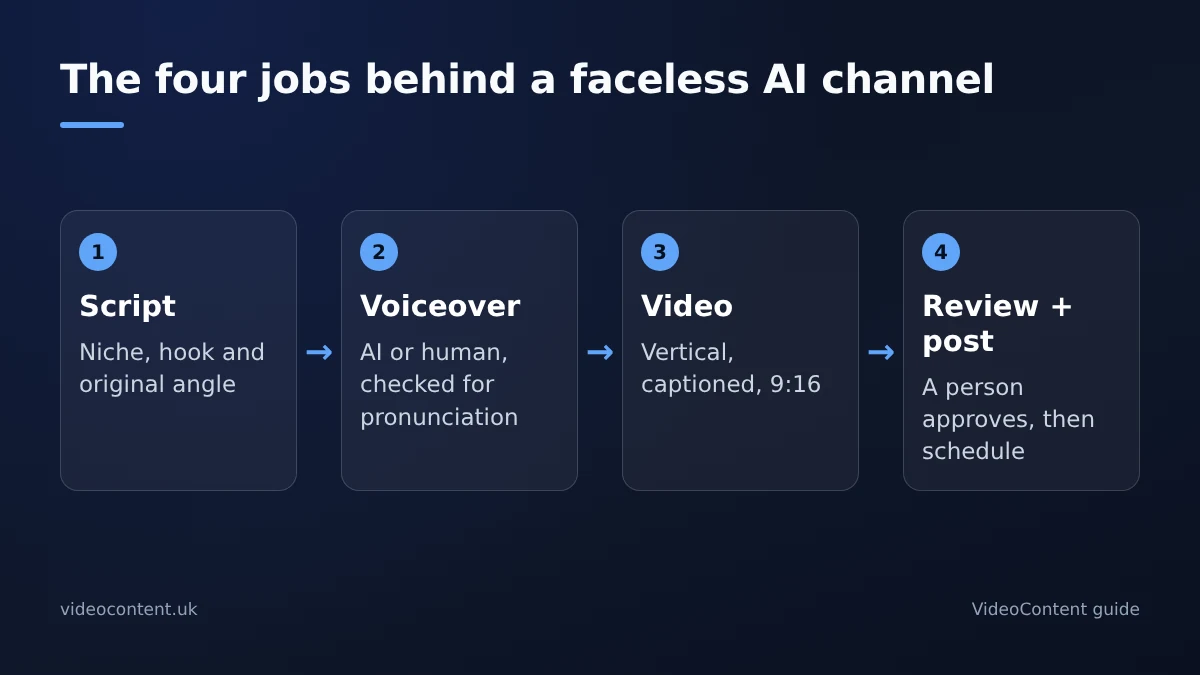
A faceless channel publishes videos with nobody on camera. AI writes the script, generates the voiceover, adds captions and assembles the visuals. Your job is to choose the topics, review each video and publish it.
There are two formats. Shorts are vertical videos of up to three minutes, shown in the swipe feed. Long-form videos earn watch hours. Both count towards monetization, through different routes: 1,000 subscribers plus either 4,000 valid public watch hours in the last 12 months or 10 million valid public Shorts views in the last 90 days (YouTube Partner Program).
Local businesses can run the same workflow for marketing: one script, one voiceover and one captioned vertical video, posted to Reels, TikTok and Shorts. Our faceless channel automation handles writing, narration, rendering and scheduled posting.
How do you start a faceless YouTube channel for free?
Step 1: pick a niche you can feed every day
Short-form rewards steady volume, so choose a topic you could script a new video for daily. Med spas, gyms and home-service businesses have plenty: common questions, before-and-afters, myths and quick tips. Solo creators can pick local history, money explainers or tool breakdowns. If you can list 30 hooks in one sitting, the niche works.
Step 2: set up the channel
Use a name that says what the videos are about, add a banner, and write a one-line description with your main keyword. Choose a schedule you can keep, even if it's one Short a day. Consistency matters more than polished branding at this stage.
Step 3: test the workflow before paying
VideoContent's free plan gives you 3 script generations and one Standard video with a small watermark, with no credit card. Use it to test hooks and see the output, and use a free editor like CapCut to trim or add your own footage. Post your first few videos within a week, check which hook held viewers longest, then decide whether to upgrade. Our faceless channel tool comparison sets out the options.
Which AI tools cover scripts, voiceover and video?
A faceless channel needs four jobs done: writing the script, generating the voiceover, making a captioned vertical video and posting on a schedule. "AI video generator" covers several kinds of tool, and the one that writes your hook may not cut your clips.
| Job | Tool | What it does | Free option |
|---|---|---|---|
| Script, voiceover and video | VideoContent | Writes the script, narrates, captions and renders a vertical video | 3 scripts and 1 watermarked video |
| Editing and captions | CapCut | Manual cuts, caption styles, audio | Yes |
| Long-form to Shorts | OpusClip | Cuts existing long videos into Shorts | Limited |
| Caption styling | Submagic | Animated captions and hooks | Limited |
VideoContent's YouTube Shorts generator covers the most jobs in one place: describe a topic and it writes the script, adds a voiceover, captions and hashtags, and renders the video. Scheduled posting is on Pro+. The trade-off is control: for frame-by-frame edits or custom caption animation, a manual editor gives you more room. Competitor free tiers change often, so check each tool's plan page.
Where VideoContent falls short
It doesn't cut down long-form footage you already have, the way OpusClip does, and videos can start to look alike if you never change your prompts and hooks. Whatever you use, keep a person in the loop.
Can YouTube demonetize AI faceless channels?
What the policies say
YouTube's monetization policies cover reused content, meaning other people's material without meaningful changes, and inauthentic content, which is mass-produced or repetitive video. In 2025 YouTube renamed its "repetitious content" policy to "inauthentic content" to make that clearer. Neither policy bans AI tools, AI voiceovers or channels where nobody appears on camera.
The practical test: did a person make real choices? Writing or rewriting the script, choosing the hook, adding your own commentary and approving the edit all count. Raw AI output uploaded with no review does not.
What gets rejected and what passes
- Rejected: unedited batches of text-to-video uploads, other people's clips with captions added, and the same template on every upload.
- Passes: original scripts, a reviewed voiceover (AI or human), visible editing, and a distinct angle or commentary.
A useful check: would the video look identical if you disappeared? If so, it's at risk. If you generate a draft quickly, then spend ten minutes fixing the script and the first three seconds, you're doing the work YouTube's reviewers look for.
If your application is rejected
YouTube emails you with the reason. Fix or remove the videos that fit the policy, then use the appeal option in YouTube Studio, which goes to a human reviewer, or reapply after the waiting period YouTube gives you. Explain briefly what changed, such as original scripts and a review of every upload, and only apply again once the channel genuinely looks different.
How do you make money beyond YouTube ads?
Ad revenue is the slowest route. You need to pass the thresholds and a channel review first. Affiliate links in descriptions can earn from your first views. Sponsors start to show interest once a niche channel posts consistently, even at modest view counts. Digital products like a template pack or short guide often earn more than ads at every stage.
If you run a med spa, gym or salon, think of the channel as a source of customers, not ad income: one booking from a local viewer is worth far more than a month of Shorts revenue. Our Shorts monetization checklist explains how the Shorts revenue pool pays.
How long does it take to reach monetization?
The thresholds are fixed; the time it takes isn't. For a channel built mostly on Shorts, the 10 million views route is usually more realistic than 4,000 watch hours, because short videos build watch hours slowly. Many channels take many months of daily posting, and plenty never get there. The most common reason is that the owner stops posting after a few weeks, before YouTube has enough data to recommend the videos widely.
One rule can cost you that progress: YouTube asks you to disclose realistic altered or synthetic content when you upload, such as a realistic AI voice imitating a real person or footage of events that didn't happen. Animated, stylized or obviously artificial content usually doesn't need the label. When in doubt, tick the box.
What separates faceless channels that succeed?
- A real hook in the first two seconds.
- One niche, so YouTube learns who to show the videos to.
- Daily posting on a schedule rather than occasional batches.
- A person watches every video before it goes live, to catch bad captions, mispronunciations or an off-sounding voiceover.
Channels that fail do the opposite: one template, dozens of uploads a week and no review. That's exactly what the inauthentic content policy is aimed at. An honest note: VideoContent makes high-volume production easy, so the discipline has to come from you. Use the generator for speed, then review each video as if your name is on it.
FAQ
Does YouTube pay for faceless AI videos?
Yes, once you join the YouTube Partner Program: 1,000 subscribers plus 4,000 public watch hours in 12 months or 10 million public Shorts views in 90 days. Your channel also has to pass a review against the reused and inauthentic content policies, so original scripts and human review matter more than the tools.
Will YouTube ban my channel for using AI voiceovers?
No. YouTube's policies don't ban AI voiceovers, AI tools or faceless channels. Channels are rejected for mass-produced, repetitive output nobody reviewed. Use the voiceover, then check pronunciation, pacing and captions before every upload.
Do I need to disclose that my videos use AI?
Only when the content is realistic and could mislead viewers, such as a realistic voice of a real person or realistic footage of events that didn't happen. Animated or obviously artificial content usually doesn't need it. When unsure, use the disclosure setting when you upload.
Can I run a faceless channel from my phone?
Yes. CapCut edits on mobile, the YouTube app and YouTube Studio handle uploads, and browser-based generators like VideoContent work in a phone browser. The workflow is the same: one niche, a review of every video, and a schedule you can keep.